VHS Player Guide: 6 Options for Watching and Digitizing in 2026

Summary: This guide compares six discontinued VHS and DVD/VHS players by viewing, digitizing, and disc-dubbing fit. It also explains current used-market labels, a safety-first buying checklist, a practical VHS-to-MP4 signal chain, modern TV connections, maintenance limits, and post-capture playback.
Table of Contents
The best VHS player is not automatically the most prestigious model. It is a documented, returnable deck that matches your goal and can handle an aging tape without turning an irreplaceable recording into a repair problem.
This 2026 guide explains what “new” VHS listings actually mean, how to inspect used hardware, how six legacy models fit different viewing and digitizing needs, and how a practical VHS-to-MP4 workflow works. My priority is simple: protect the tape first, then optimize picture quality and convenience.

New, Refurbished, or Used?
Most new VHS players advertised today are not newly manufactured mainstream VCRs. As of July 2026, conventional mass production has been over since 2016, so US buyers are mainly choosing among used, seller-refurbished, and new-old-stock legacy hardware.
Why 2016 Still Matters
The end of conventional VCR mass production matters because age now affects every purchase. Renewed interest, boxed inventory, and announced prototype products do not create a normal retail market with consistent warranties, parts, or factory support.
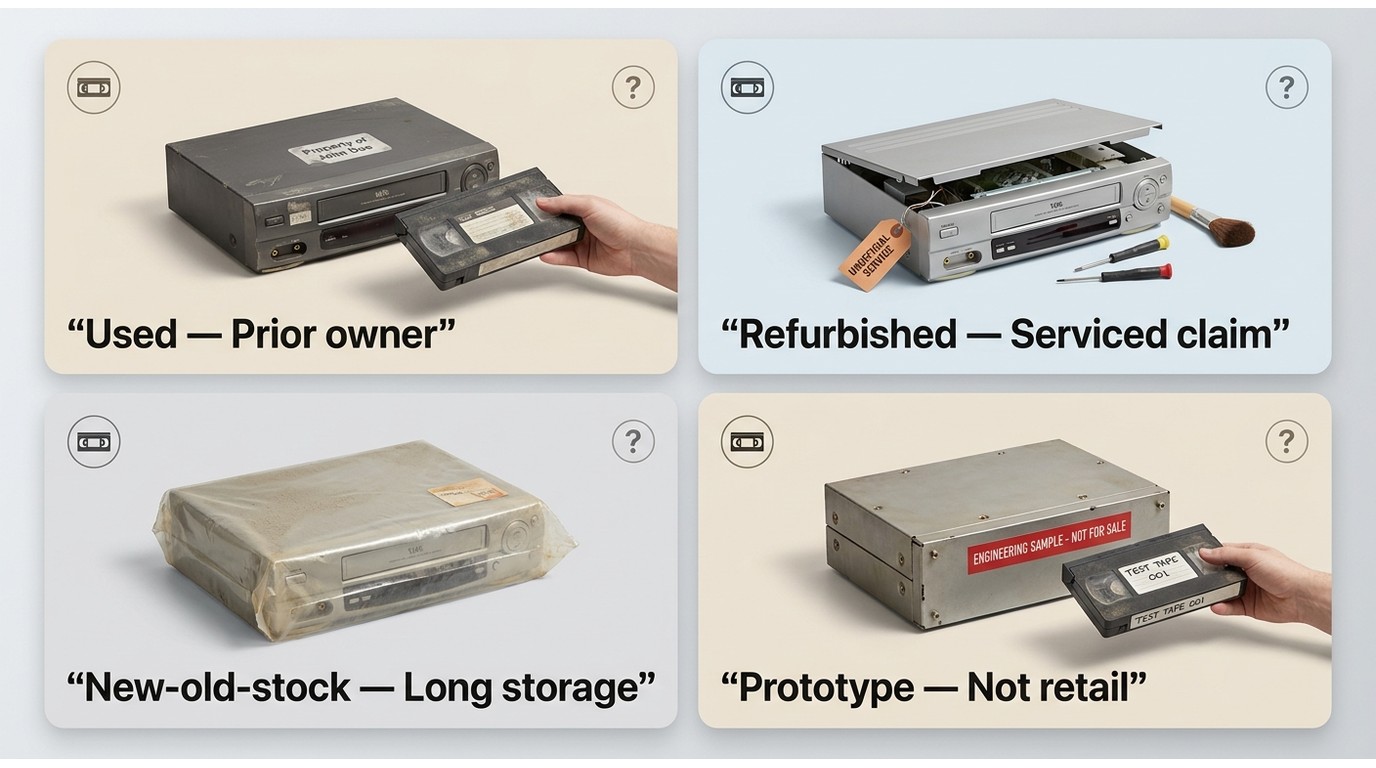
A used machine has had at least one prior owner. A refurbished machine should have documented inspection or service, although marketplace sellers do not always use the term consistently. New-old-stock means an older unit that was never sold or used, not a newly designed VHS player. Even unused belts, capacitors, and lubricants can age while a deck sits in storage.
What Marketplace Listings Mean
A listing may call a VHS player “new” because it is boxed, cosmetically clean, or untested. None of those labels proves that it can load, play, rewind, and eject a tape safely. Likewise, phrases such as “top rated VCRs” or “high quality VCR” should be treated as sales language unless the seller provides a repeatable test and clear return terms.
- Used: Prior use is expected; condition and testing can range from excellent to unknown.
- Seller-refurbished: Some service is claimed; ask exactly what was cleaned, replaced, adjusted, and tested.
- New-old-stock: Old inventory with little or no use; age-related deterioration is still possible.
- Prototype or announced hardware: A future-facing product announcement is not the same as widely available retail stock.
My buying judgment is that condition evidence and return protection matter more than the word “new.” A plain-looking serviced deck with a playback video is a safer bet than a sealed box with no functional proof.
Used VHS Player Buying Checklist
The best VHS player purchase starts with the individual unit, not the badge on its front panel. Before buying a VHS tape player, confirm that the seller has tested the complete tape transport and will accept a return if the description proves inaccurate.
Seller Testing and Return Protection
Ask for a continuous video showing a known-good tape loading, playing with sound, pausing, fast-forwarding, rewinding, and ejecting. The clip should also show the exact serial-number label or a distinctive mark on the unit so the test cannot be mistaken for another deck.
- Confirm that the seller tested both picture and sound, not merely that the unit powers on.
- Listen for grinding, repeated clicking, squealing, or a motor that continues after the tape stops moving.
- Ask whether the unit was stored in a damp basement, hot attic, garage, or smoking environment.
- Request the service history, including any belt, gear, capacitor, pinch-roller, or power-supply work.
- Check whether the original or compatible remote and required cables are included.
- Choose a return window long enough to inspect and test the deck after delivery.
I would take a serviced midrange deck with credible test footage and returns over an unverified prestige model. For a beginner, lower purchase uncertainty is usually more valuable than a feature that may not work on the delivered unit.
Safe First-Play Inspection
Never make an irreplaceable tape the first cassette placed in an unknown VCR. Shipping damage, debris, a seized roller, or a failing loading mechanism can wrinkle tape before the picture gives any warning.
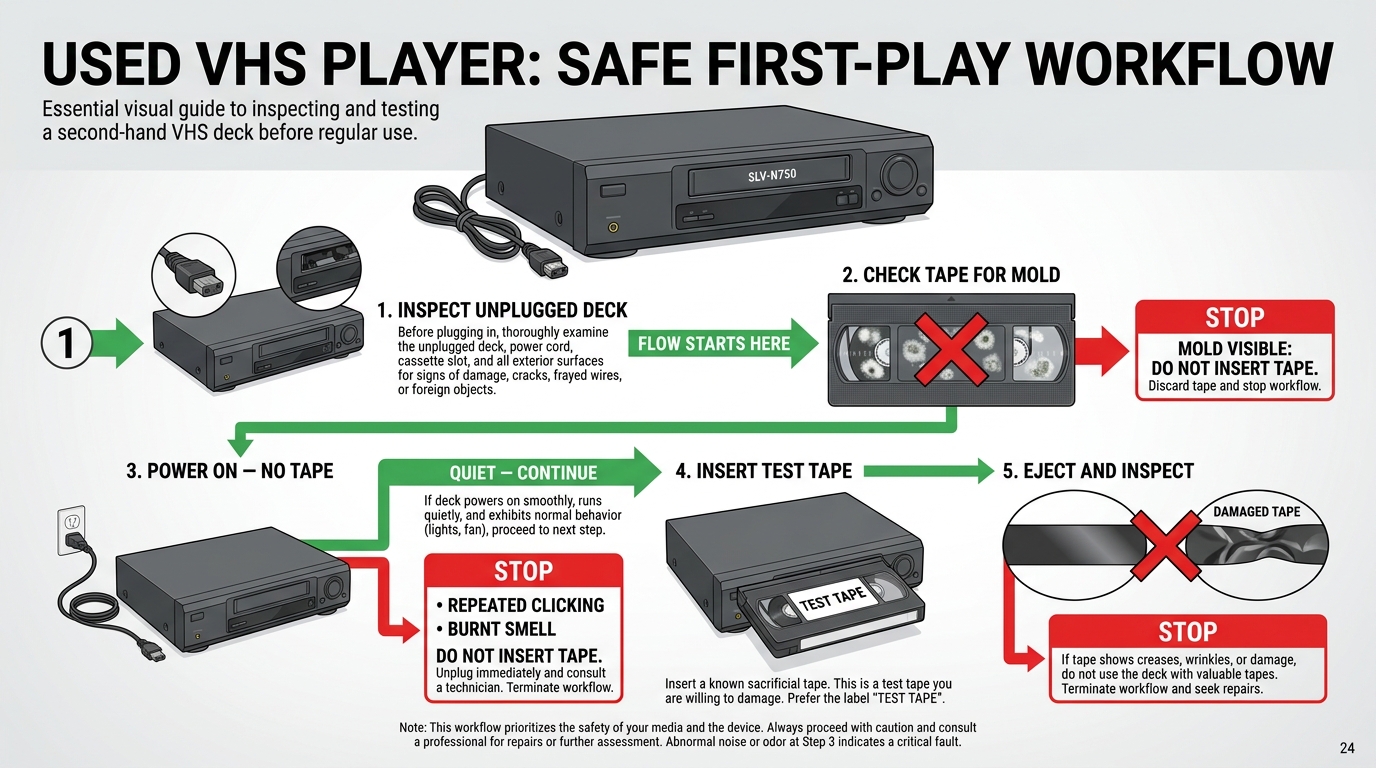
- Unplug the VCR and inspect the case, power cord, vents, and cassette opening for impact damage, loose parts, liquid residue, or a burnt smell.
- Inspect the test cassette through its clear window. Isolate any tape with visible white or fuzzy mold rather than inserting it.
- Place the deck on a stable surface with ventilation, connect it to a display, and power it on without a cassette. Stop if it clicks repeatedly or smells hot.
- Use a sacrificial, known-good tape. Test load, short playback, stop, rewind, and eject while watching for Edge damage or slack tape.
- Inspect the cassette again after ejection. If the ribbon is creased, loose, or marked, discontinue testing and arrange service.
Service History and Failure Risks
A high quality VCR can still be a poor purchase when its service history is unknown. Aging belts can slip, gears can fracture, capacitors can leak, solder joints can fail, alignment can drift, and worn heads can reduce picture quality. Cosmetic condition does not reveal those faults.
Service records are most useful when they name the work and date rather than simply saying “refurbished.” Electrical faults, transport timing, and alignment work belong with a qualified technician. That boundary protects both the deck and the tape.
Best Standalone VHS Players
These three discontinued standalone decks represent different answers to a best VHS player search: higher-control digitizing, prosumer capture, and straightforward viewing. “Best” here is limited to the stated use case among these six retained legacy options, not a score-based claim about the entire secondhand market.
| Legacy model | Best use | Market condition | TBC or DNR | Video outputs | HDMI availability | Dubbing direction | Service risk | Buying caveat |
|---|---|---|---|---|---|---|---|---|
| JVC HR-Series S-VHS decks | Higher-control DIY capture | Discontinued; used or refurbished | Model-dependent; verify the exact deck | Composite and S-Video on relevant variants | Not built in | None | Complex mechanisms may need specialist service | Require a playback sample and exact model number |
| Panasonic AG-Series decks | Demanding digitizing workflows | Discontinued; used or refurbished | Model-dependent; AG-1980 is the key reference | Composite and S-Video on relevant variants | Not built in | None | Capacitor condition and prior repairs matter | Confirm service history and stable output |
| Sony SLV-N750 | Routine tape viewing | Discontinued; mainly used | No capture-grade correction assumed | Composite analog output; inspect the rear panel | Not built in | None | Age-related consumer-deck wear | Do not buy it as a substitute for a corrected capture deck |
| Samsung DVD-VR375 | VHS-to-DVD convenience | Discontinued; secondary market | No capture-grade correction assumed | Analog outputs plus HDMI on documented units | Built in; test the port | VHS-to-DVD workflow; confirm operation | Two transports create more failure points | Test both the tape and disc mechanisms |
| Magnavox ZV427MG9 | Modern-display connection and disc dubbing | Discontinued; used, refurbished, or boxed legacy stock | No capture-grade correction assumed | Analog outputs and HDMI | Built in with upscaling | DVD/VHS dubbing; verify both directions on the unit | Disc and tape sections both need testing | Upscaling improves connection, not VHS detail |
| Toshiba DVR620 | Direct VHS-to-DVD transfer | Discontinued; mainly used | No capture-grade correction assumed | Check the exact unit and intended display path | Confirm against the unit and manual | One-touch VHS-to-DVD use case | Media compatibility and both transports matter | It does not replace an editable VHS-to-MP4 setup |
“Model-dependent” means a family name covers multiple revisions or configurations. Match the seller's exact model number and rear-panel connections to the manual before treating any feature as present.
JVC HR-Series S-VHS Decks
JVC HR-Series S-VHS decks remain respected high quality VCR options for a VHS digitizing setup, but the family name alone does not guarantee a time-base corrector, noise reduction, S-Video, or healthy mechanics. The exact model and the condition of the delivered unit decide its value.
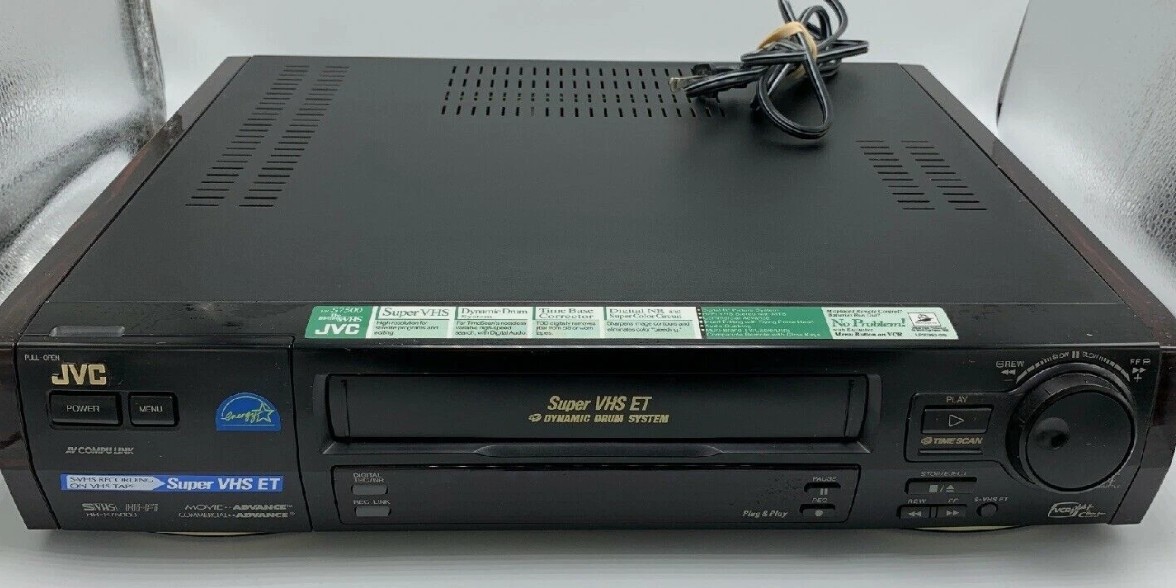
- Best for: A larger DIY archive where unstable recordings justify better playback correction and the buyer can verify the specific model.
- Not ideal for: Someone who wants inexpensive plug-and-play viewing or has no access to specialist service.
- Check before buying: Stable playback, S-Video output where required, remote operation, and whether the advertised correction features actually engage.
My take is that a JVC nameplate is not enough. A serviced lower-tier HR deck with clear test footage can be a more rational capture choice than a famous model with an unknown transport.
Panasonic AG-Series Prosumer Decks
A Panasonic AG-Series high quality VHS player can suit demanding capture work, especially when the exact unit is an AG-1980 with documented operation. Buyers should not generalize chassis, correction, audio, or durability claims across every AG model.
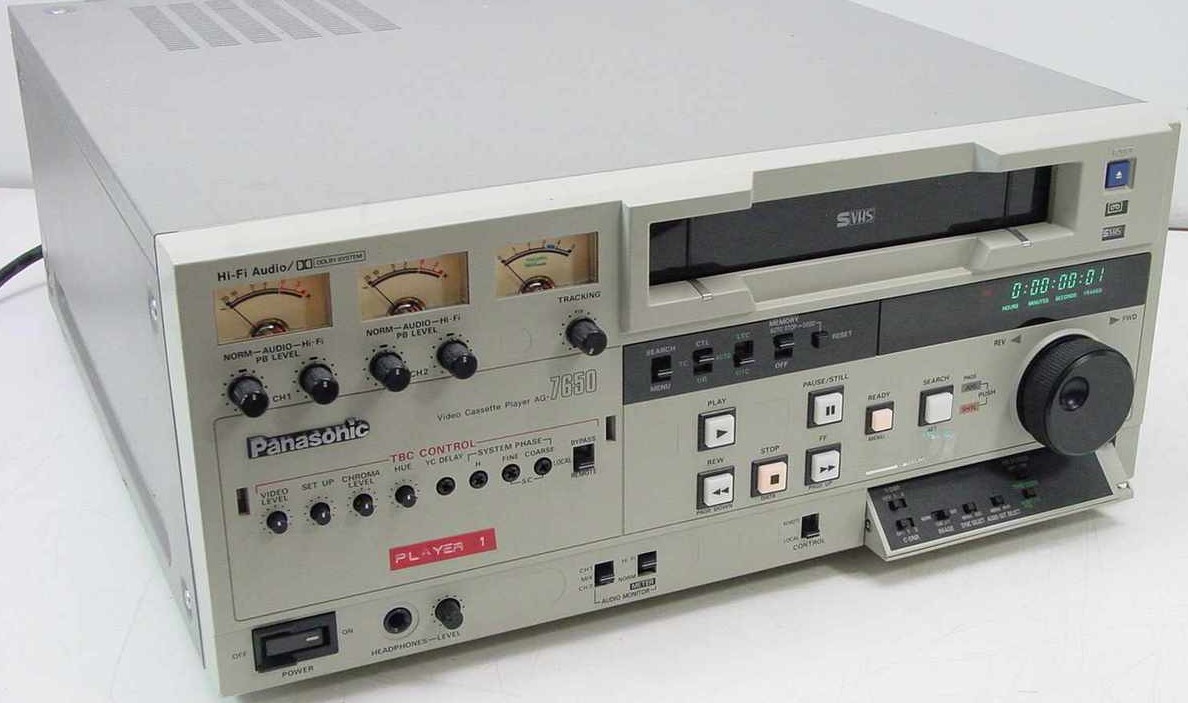
- Best for: DIY digitizing where difficult tapes and consistent analog output justify a serviced prosumer deck.
- Not ideal for: Buyers who cannot verify capacitor condition, previous repairs, and stable playback before the return period ends.
- Check before buying: The exact model, visible picture stability, audio continuity, and an itemized service record.
The practical trade-off is control versus repair exposure. I would consider an AG deck only when the seller can show what was serviced; an untouched unit with a strong reputation can still become an expensive bench project.
Sony SLV-N750 Hi-Fi VCR
The Sony SLV-N750 is better framed as a discontinued VHS tape player for routine viewing than as an archival capture reference. Unsupported claims about specialized heads, named enhancement circuits, or rewind timing should not drive the purchase without model documentation.
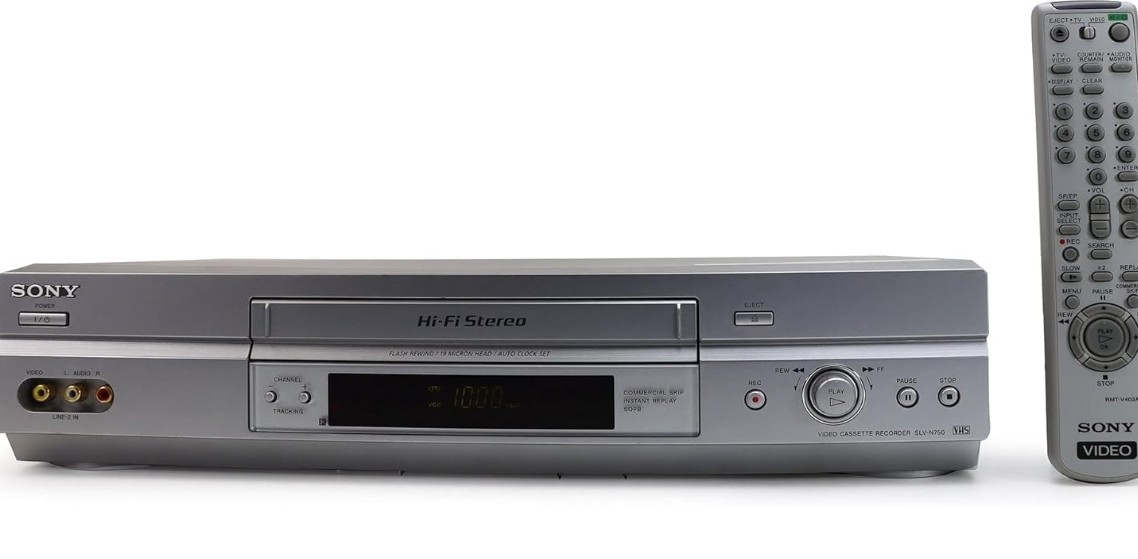
It fits a small collection of stable tapes when the delivered unit demonstrates clean loading, playback, sound, rewind, and eject behavior. It is less suitable for damaged or timing-unstable recordings that need a serviced deck with verified correction features.
Among best VCR reviews, ordinary consumer decks are often overlooked because they lack dramatic specifications. For casual viewing, however, documented condition and a return policy can make this simpler Sony a more sensible choice than an untested prosumer machine.
Best DVD/VHS Combo Players
A VHS DVD player or DVD/VHS recorder prioritizes convenience: fewer boxes, direct disc dubbing on supported models, and sometimes an easier path to a modern display. The trade-offs are model-specific repairability, two aging transports, and less control than a dedicated capture chain.
My preference is a checked standalone deck for difficult tapes and higher-control capture. A combo makes more sense when shelf space is limited or direct VHS-to-DVD transfer is the actual goal.
Samsung DVD-VR375 Combo
The Samsung DVD-VR375 is discontinued legacy hardware sold through the secondary market. Its value rests on documented disc-format support, the behavior of its dubbing workflow, and the condition of both the tape transport and disc drive.
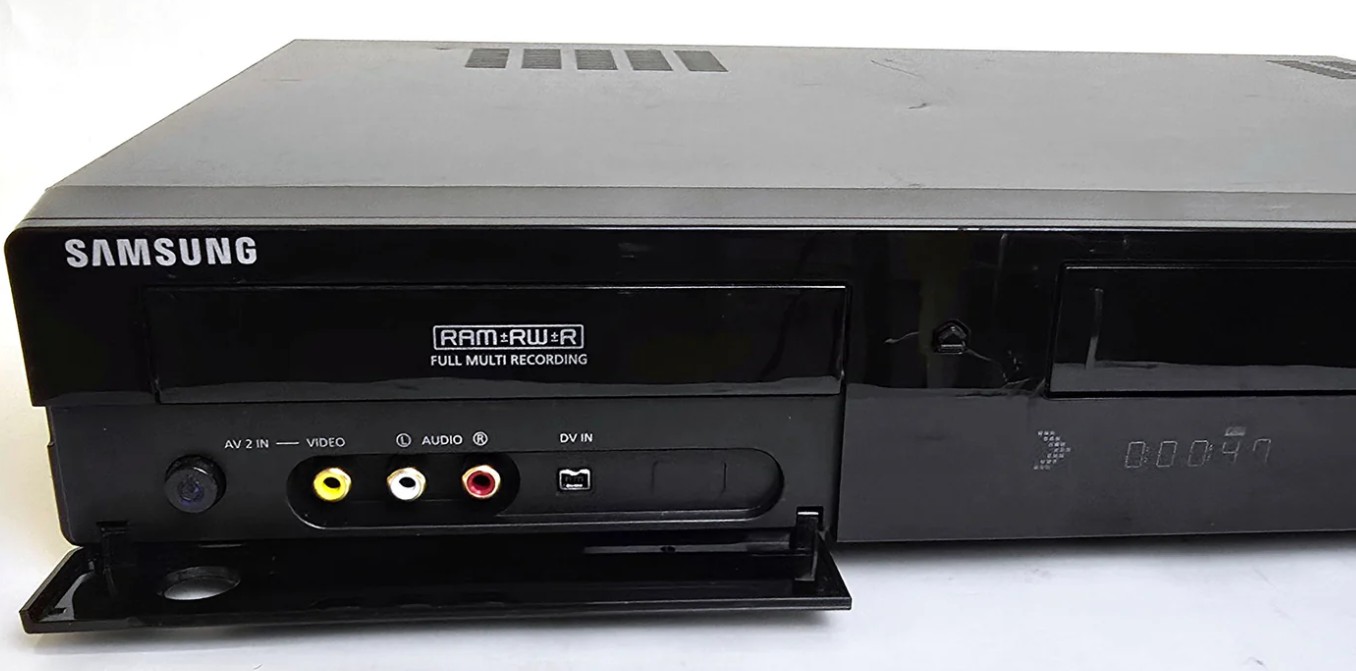
This model can fit a buyer who wants an integrated DVD VHS recorder and can test every relevant function promptly. It is a poor fit when the listing says only “powers on,” because that proves neither transport can complete a recording.
- Confirm that the exact unit plays and ejects both a known-good VHS cassette and a compatible disc.
- Test the intended dubbing direction rather than assuming every advertised function remains operational.
- Verify HDMI and analog outputs on the delivered unit before the return period closes.
Magnavox ZV427MG9 Combo
The Magnavox ZV427MG9 is a used, refurbished, or limited boxed-inventory option for buyers seeking a VHS player with HDMI. Its HDMI upscaling can simplify connection to a modern display, but it cannot reconstruct picture detail that was never present on the tape.
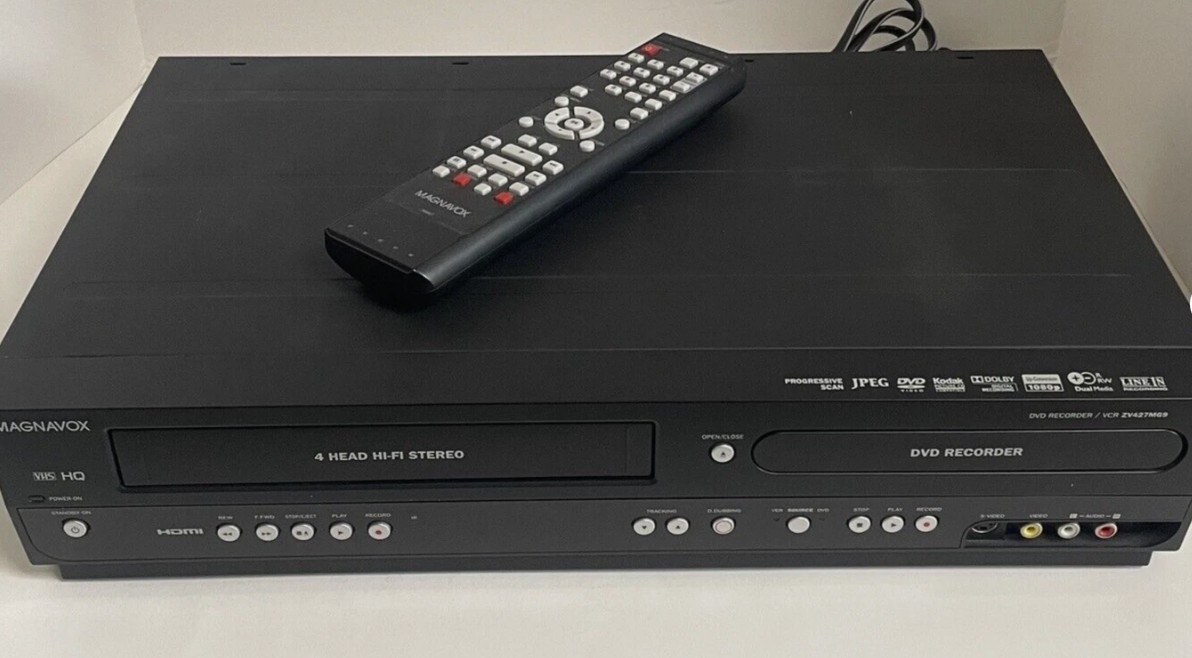
- Best for: A compact viewing or disc-dubbing setup where built-in HDMI reduces adapter clutter.
- Not ideal for: A buyer expecting upscaling to turn VHS into true high-definition video or guarantee compatibility with every television.
- Check before buying: Both transports, HDMI output, analog input behavior, and the required dubbing direction.
I see HDMI here as a connection feature, not a preservation feature. The quality ceiling still comes from the tape, the playback path, and the condition of the deck.
Toshiba DVR620 Combo
The discontinued Toshiba DVR620 fits direct VHS-to-DVD convenience when its one-touch workflow, compatible blank media, finalization process, and two transports work correctly. That disc-centered process is not the same as capturing an editable MP4 file.
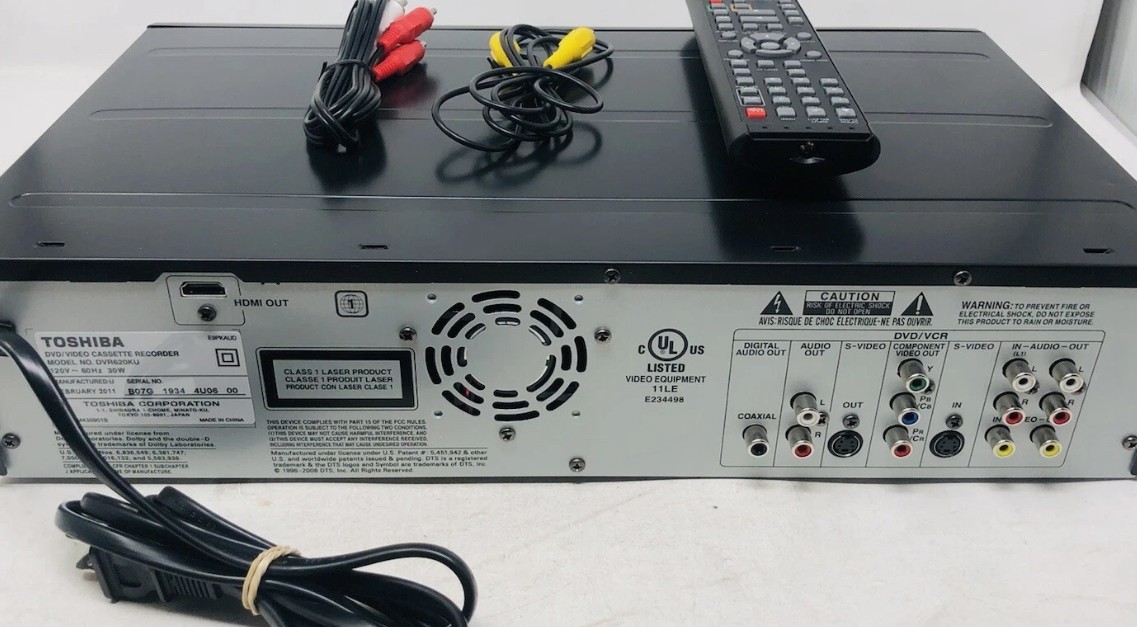
Choose it when the desired result is a playable disc and the seller can demonstrate recording and finalization. It is not ideal for color correction, detailed editing, batch file naming, or a larger VHS-to-MP4 project that needs direct file control.
VHS-to-MP4 Equipment and Workflow
A reliable VHS-to-MP4 result depends on the whole signal chain: tape condition, playback deck, analog connection, optional timing correction, capture device, recording software, and audio monitoring. A “converter” label cannot compensate for a damaged tape or unstable VCR.
Deck Features That Matter
For a VHS digitizing setup, stable tape handling matters before enhancement features. Use composite video when that is the deck's appropriate output; use S-Video only when a compatible S-VHS deck and capture path support it. A verified time-base corrector or noise-reduction feature can help difficult signals, but it should not be assumed from a series name.
- A few stable tapes for casual viewing: A serviced consumer deck and a compatible capture device may be sufficient.
- A larger DIY archive: Prioritize a verified S-VHS or prosumer deck, stable signal handling, repeatable settings, and careful file organization.
- Valuable, moldy, damaged, or repeatedly unstable tapes: Stop DIY playback and use a qualified transfer or conservation service.
My rule is to spend effort according to tape risk, not internet prestige. The most elaborate deck is unnecessary for a clean two-tape project, while a fragile recording should not be used to learn repair or capture technique.
Capture Devices and File Outputs
The capture device converts analog video and audio into data the computer can record. Compatibility with the computer, operating system, input type, and recording software matters more than packaging claims about instant quality.
- Inspect the tape and verify safe playback on a known-good display path.
- Connect the deck's appropriate composite or S-Video output and matching audio outputs to the capture device.
- Install the supported driver or software, select the correct input standard, and monitor both picture and sound.
- Record a short test segment, then check lip sync, dropped frames, aspect ratio, color, and audio level before running the full tape.
- Create a clearly labeled preservation file and, if needed, a smaller MP4 access copy for routine viewing.
For commercial or otherwise protected material, proceed only for content you are authorized to copy, where permitted by platform terms and applicable law. If a protection signal appears, stop rather than looking for a way around it.
Modern TV and HDMI Connections
A VCR for smart TV use usually needs either a television with analog inputs, a combo deck with working HDMI, or an analog-to-HDMI converter. A VHS player with HDMI can reduce cable complexity, but conversion and upscaling improve connection compatibility rather than source detail.
Set the television to the converter's HDMI input, preserve the original 4:3 aspect ratio when possible, and route audio through the same signal path to reduce sync complications. If the TV reports no signal, test the VCR on an analog-compatible display before blaming the converter.
Troubleshooting Sync and Color
Capture hardware can reject timing or color variations that a television tolerates. When direct TV playback looks normal but the recording drifts, drops frames, or loses color, diagnose the chain one component at a time.
- Audio drift: Make a short test, confirm the capture software's audio source, and avoid changing devices or settings mid-recording.
- Dropped frames: Close competing applications, confirm driver compatibility, and test another supported USB port without adding an unpowered hub.
- Unstable color or rolling picture: Recheck the cable, input standard, tape condition, and deck output. A difficult signal may need verified timing correction or professional handling.
- Device mismatch: Confirm that the capture hardware and software support the computer's operating system and the selected analog input.
- Protected commercial recording symptoms: Stop the capture. Do not attempt to defeat the protection.
Common VCR Issues and Maintenance
Dirty heads are only one possible cause of VCR trouble. Aging belts, gears, capacitors, solder joints, alignment, and head wear can also produce noise, loading failures, unstable playback, or lost sound.
Cleaning is reasonable only after a basic inspection points toward contamination. Electrical work, transport timing, and alignment should be handled by a qualified technician rather than guessed at with a valuable tape inside.
A Safe Cleaning Procedure
Start with the least invasive action. Head-cleaning methods differ in abrasiveness and risk, and manual contact with the drum is delicate work that can damage small head chips.
- Unplug the VCR and check for mold, debris, liquid residue, loose parts, or a damaged cassette path.
- Do not insert a moldy tape or use an irreplaceable recording as a diagnostic cassette.
- Follow the deck manufacturer's maintenance guidance if it is available. Use only a suitable cleaning method intended for the equipment.
- If cleaning requires opening the chassis and you cannot confidently identify the drum, head chips, and tape path, stop and use qualified service.
- After any approved cleaning, test with a sacrificial known-good tape and inspect it immediately after ejection.
The useful stopping point is just as important as the procedure: repeated noise, tape slack, creasing, or a picture that worsens means the deck should not receive another cassette.
Tracking and Audio Sync Fixes
White streaks, a rolling image, buzzing, or intermittent sound can occur when the deck struggles to follow the recorded tracks. On many remotes, Channel Up and Channel Down provide manual tracking adjustment when automatic tracking cannot settle the picture.
If Hi-Fi audio cuts in and out, switching the deck's audio output to Linear or Normal can produce steadier mono sound. If manual tracking cannot stabilize a known-good tape, stop repeated playback and investigate the deck, cassette condition, cable, or capture chain instead of assuming more adjustment will solve it.
Playing Your Digitized VHS Library
After capture, the task changes from tape handling to dependable playback of authorized local MP4 or VOB files and burned DVDs. PlayerFab DVD Player is a Windows and Mac desktop option for supported local files and DVD sources; it is not capture hardware, a tape-repair tool, or a remedy for an unstable VCR.
Older disc playback can be awkward when Windows Media Player does not handle the desired DVD path, while VOB output may need a player that recognizes the disc-file structure. PlayerFab can place supported local video and DVD playback in one interface without expanding the VHS workflow into a separate conversion project.
- Use it to play supported local MP4 or VOB results after the capture is complete.
- Use DVD playback when a combo recorder produced a finalized disc.
- Do not expect playback software to repair tracking, timing, color, or physical tape damage.
It is a practical fit for someone who wants one desktop playback interface after digitizing. Readers who still need to capture analog video should finish that job with appropriate hardware first.
Free Trial for Windows or Free Trial for Mac
Which VHS Player Fits Your Goal?
The right VHS player depends on the job. Choose a serviced consumer deck for casual watching, a verified S-VHS or prosumer deck for demanding DIY capture, or a fully checked DVD/VHS combo when direct disc convenience matters most.
- Casual viewing: Favor a clean, demonstrated consumer VCR such as the Sony SLV-N750 over a complex unverified deck.
- Higher-control digitizing: Consider an exact, serviced JVC HR-Series or Panasonic AG-Series model with the outputs and correction features your workflow requires.
- Direct DVD dubbing: Choose a Samsung, Magnavox, or Toshiba combo only after both transports and the intended recording path are demonstrated.
For a best VHS player 2026 decision, individual condition, test evidence, service records, and return protection outweigh model prestige. PlayerFab is an optional post-capture playback fit for supported files and DVDs, not the climax of the hardware choice.
FAQ
Can I watch a VHS tape without owning a VCR?
The tape must still be played by compatible VHS hardware somewhere. You can borrow a tested deck or use a local or professional transfer service; after transfer, the resulting digital file can be watched without keeping a VCR.
Do I need a premium archival VCR for a small collection?
Not necessarily. A serviced everyday deck can suit a few stable tapes or casual viewing. A large collection, valuable recordings, damaged cassettes, or unstable playback justifies verified correction features or professional help.
Can a VHS-C tape play in a standard VCR?
VHS-C generally needs a compatible mechanical adapter for standard VHS hardware. Inspect the adapter carefully because a damaged mechanism can harm the cassette. VHS-C is different from 8mm formats, which do not work in a VHS-C adapter.
Why does capture fail when TV playback looks normal?
A television may tolerate unstable timing, color, or connectors that a capture device rejects. Check the tape, deck, cable, driver, input standard, and software in sequence. If a commercial recording presents a protection signal, stop rather than attempting to defeat it.

 Play Video Files: 4 Paths Across Formats and DevicesBy James Morgan - Sep 22, 2026
 12 Best HEVC Players for Windows, Mac, and 4K (2026)By Alice Harper - Aug 4, 2026
 Best WMV Player for Mac and How to Play WMV on Mac NativelyBy James Morgan - Aug 4, 2026
 8 Best TS File Players and Playback Tools for 2026By Alice Harper - Jul 28, 2026