8 Best Media Players for TV in 2026, by Setup

Summary: This source-first guide compares eight media-player routes for streaming apps, NAS libraries, USB drives, and PC-connected discs or ISO files. It explains Direct Play, HDR and audio compatibility, remote usability, server needs, and the tradeoffs that matter in daily viewing.
Table of Contents
The best media player for TV is the one matched to your source: streaming apps favor a simple box, NAS libraries need a capable client, USB drives need direct file support, and discs or ISO files usually point to a PC connected by HDMI.
That source-first rule is my starting point because a long format list means little if the remote is awkward, the network forces transcoding, or the audio path does not suit the receiver. This guide compares eight scoped picks, explains how to evaluate them, and ends with a setup-based verdict.
Choose Your TV Media Path First
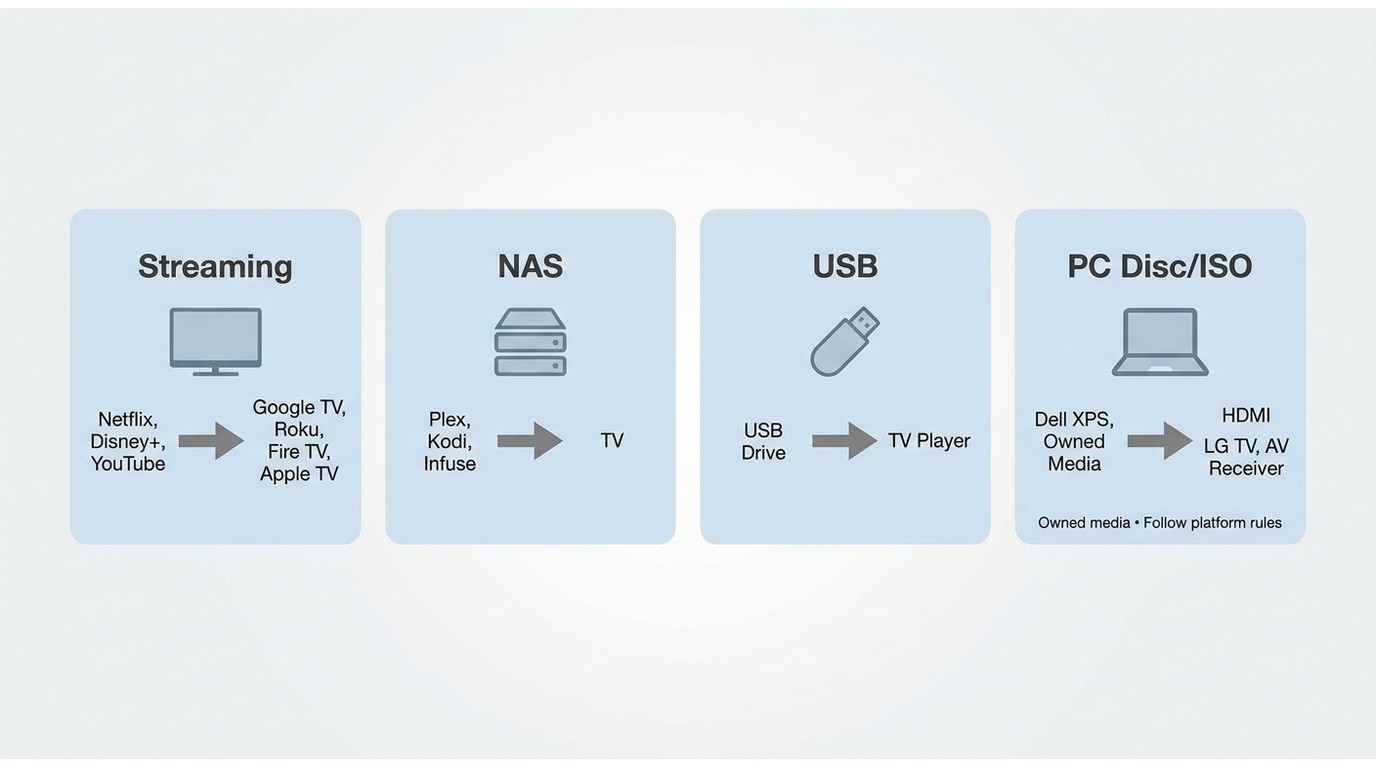
A media player for TV should be chosen by where the video starts, not by the most impressive logo on the box. Four source paths cover most setups, and each creates a different tradeoff between convenience, file control, and maintenance.
Streaming Apps and Services
A streaming media player is the cleanest route when most viewing happens inside services such as Netflix, Prime Video, Disney+, or YouTube. The practical priorities are app support, a responsive remote, stable Wi-Fi, and HDR or audio formats that match the television and receiver.
Best for: viewers who want one compact device and a familiar app-first home screen. Not ideal for: disc collections, ISO menus, or demanding local files that fall outside the device's client support.
NAS and Local Files
A local media player setup for a TV and NAS works best with Kodi, Plex, Infuse, or another client that understands network shares. Direct access through SMB or NFS keeps the path simple, while a server-client design adds metadata, remote access, and device management.
The tradeoff is upkeep. A direct client asks more of the playback device; a server can adapt files for weaker clients, but it must stay available and may need enough processing capacity for transcoding.
USB Drives and Hard Drives
A TV media player with USB support can play files without a server when the television or box recognizes the drive, file system, container, codec, audio track, and subtitles. A TV media player paired with a hard drive also needs enough USB power or a separately powered drive.
Best for: a small, portable collection with straightforward formats. Not ideal for: a large library that needs shared metadata, multi-room access, or frequent updates.
PC, Disc, and ISO Sources
A TV media player connected by HDMI is the most direct route for local files, legally owned discs, ISO images, and folder structures. The computer handles playback, then sends video and audio to the TV or receiver through the HDMI signal chain.
This path offers more control over menus and audio output, but it adds a computer, operating-system maintenance, and a couch-control problem. My judgment is simple: identify the source path first, and most expensive buying mistakes disappear before the shortlist begins.
How We Evaluated Each Option
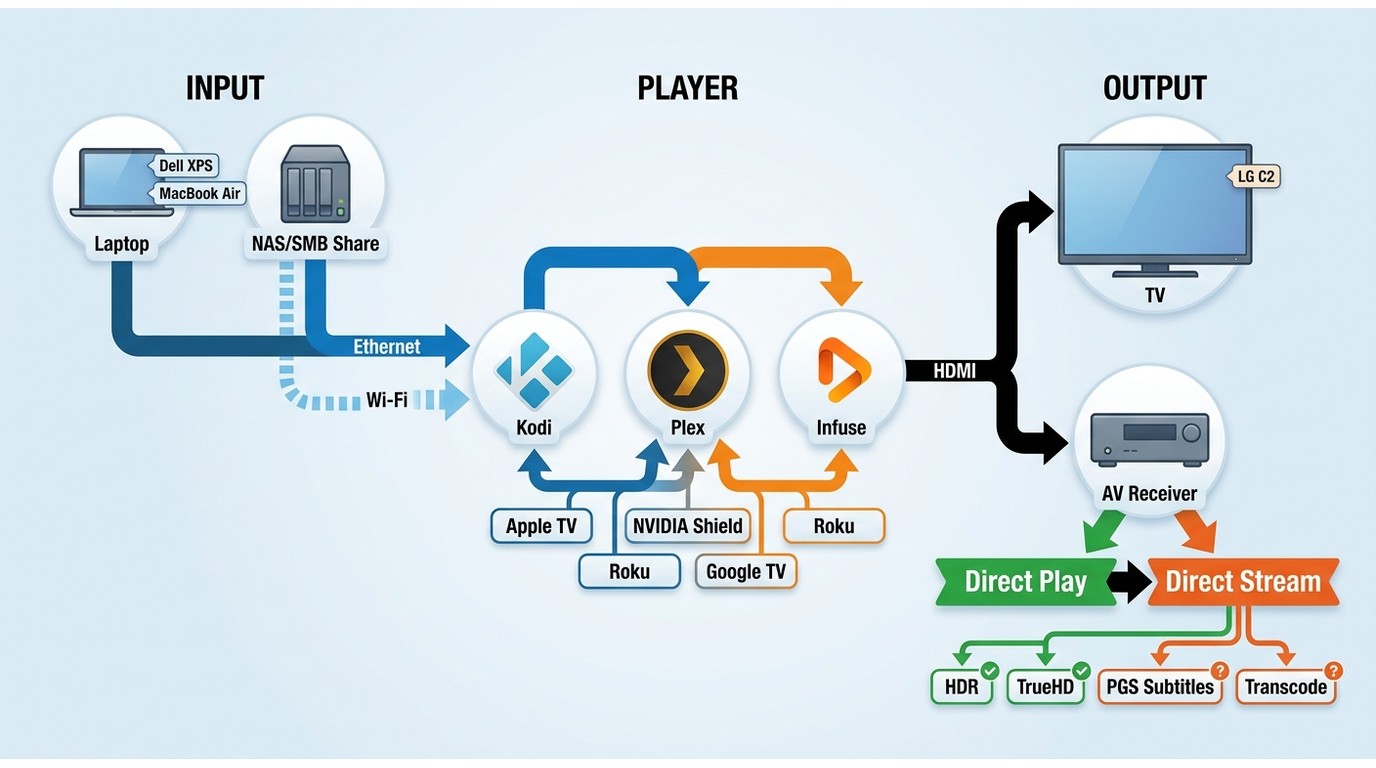
The best media player for TV is not determined by a single 4K badge. A useful evaluation follows the hardest real file through the complete signal chain, then checks whether playback, control, and maintenance remain practical.
Test Files and Signal Chain
The representative file classes are high-bitrate MKV video, MP4 with HEVC or AV1, HDR10 and Dolby Vision samples, lossless TrueHD or DTS-HD audio, PGS subtitles, and legally owned disc, ISO, or folder sources. These classes reveal different failure points without pretending one sample represents every library.
The signal chain should be recorded before comparison: player or client, HDMI connection, television, and any AV receiver or soundbar. For network playback, note whether the path is wired Ethernet or Wi-Fi and whether the file comes from a NAS, desktop server, or direct share.
The desktop test bed uses a Dell XPS 15 and a MacBook Air M2, connected by HDMI either directly to an LG C2 OLED TV or through an AV receiver when audio passthrough is the focus. The file set is assessed for playback smoothness, subtitle rendering, and CPU or GPU load.
Playback, Remote, and Network Checks
Each route is checked for Direct Play, Direct Stream, or transcoding; subtitle behavior; lossless-audio output; startup and resume; remote response; HDMI-CEC; and recovery after the app closes. Wired and wireless paths are considered separately because a client problem can look like a network problem.
- Use the most demanding representative file in the actual library.
- Confirm the playback mode and note any container, audio, or subtitle conversion.
- Repeat the path over the connection used in daily viewing.
- Test pause, resume, seeking, remote control, and reopening the app.
- Score source fit, playback path, control effort, and ongoing maintenance.
I give more weight to this chain than to a format logo. A device can recognize HEVC yet still transcode because of one audio track or subtitle format, which changes both server load and the viewing experience.
Best Streaming Hardware by Setup
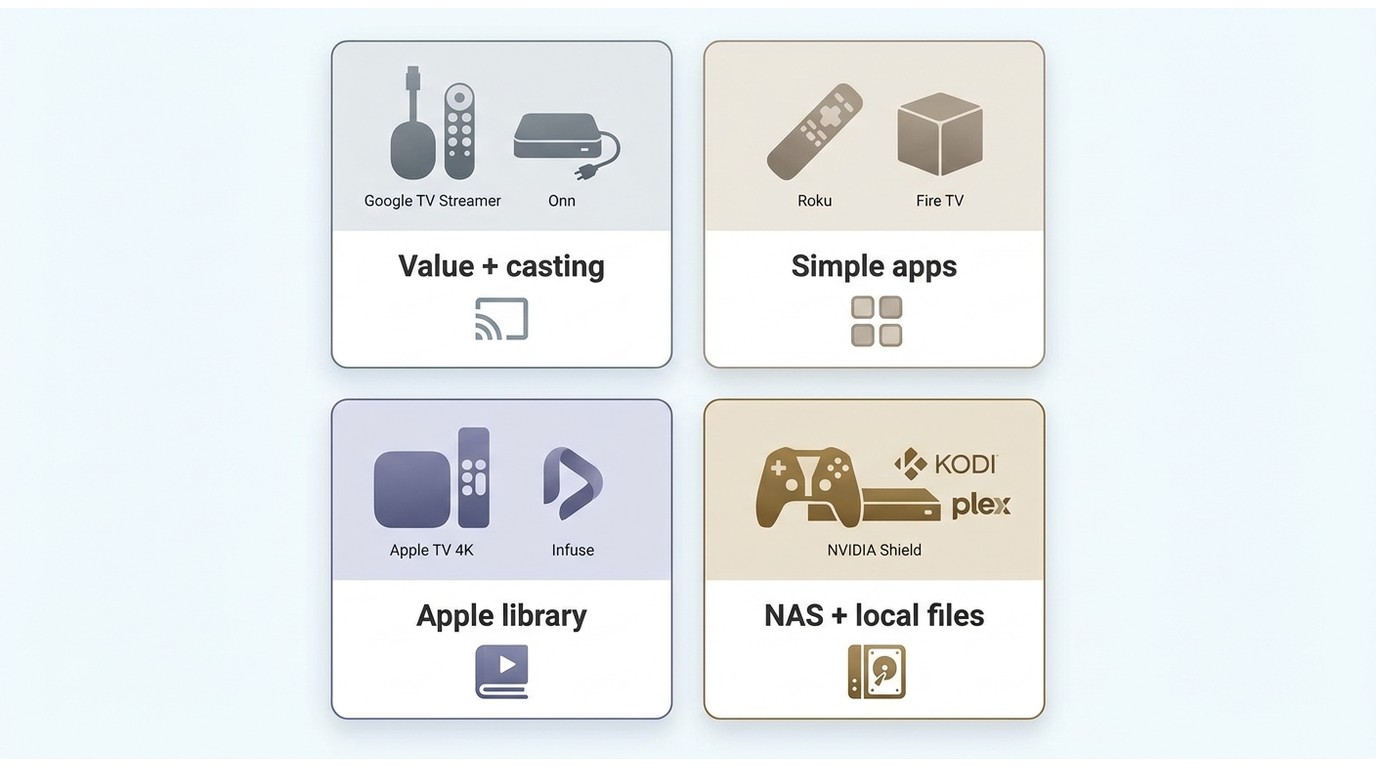
These hardware picks are "best" only within a defined setup. Google TV or Onn emphasizes value, Roku or Fire TV emphasizes simple streaming, Apple TV rewards Apple ecosystem fit, and NVIDIA Shield remains a specialized local-media route.
Google TV and Onn for Value
Google TV and Onn devices fit viewers who want broad app access, voice search, and a familiar recommendation-driven interface without building a server workflow. Google's current TV Streamer supports 4K, Dolby Vision, and Dolby Atmos, while specific Onn capabilities depend on the model.
Best for: app streaming, casting, and Google ecosystem integration. Not ideal for: disc menus or a library dominated by demanding audio and subtitle combinations. Remote usability is generally straightforward, but local playback still depends on the installed app and its codec support.
Roku and Fire TV for Simplicity
Roku and Fire TV make sense when daily viewing is primarily app-based and a simple remote matters more than local-file flexibility. Roku favors a focused channel interface; Fire TV fits more naturally with Alexa and Amazon services.
Best for: mainstream streaming with minimal setup. Not ideal for: extensive NAS libraries, ISO sources, or lossless-audio workflows. Both product families offer 4K/HDR models, but model, app, television, and receiver support must line up for the intended format.
Apple TV for Ecosystem Fit
Apple TV 4K is a strong fit for viewers already using Apple services and devices, especially when Infuse will handle a local library. The remote and tvOS interface keep daily use consistent, while the hardware provides a polished app environment.
Best for: Apple ecosystem streaming and local files through Infuse. Not ideal for: Windows-first workflows or users who require native bitstream output for every lossless home-theater track. Its limits are more about the audio path and app model than raw resolution.
NVIDIA Shield for Demanding Local Files
NVIDIA Shield is a specialized local media player TV choice for users who value Android TV, Kodi, Plex clients, Ethernet, and broader local-file handling. It should not be treated as an automatic winner for viewers who mainly open a few streaming apps.
Best for: established local libraries and users willing to tune the client. Not ideal for: buyers who prioritize the newest, least expensive app-streaming hardware. For 4K/HDR and lossless audio, the app, file profile, Shield model, display, and receiver still need to agree.
Kodi, Plex, and Infuse Compared
Kodi, Plex, and Infuse solve different library problems. Kodi is a flexible player, Plex is a server-client system, and Infuse is an Apple-platform client. Choosing among them begins with who manages the files and where playback must happen.
Kodi for Flexible Local Playback
The Kodi media player is best for a user who wants a remote-friendly interface over local drives or SMB/NFS shares and is comfortable configuring the experience. It runs on several desktop and TV-oriented platforms, with hardware determining the final HDR and audio path.
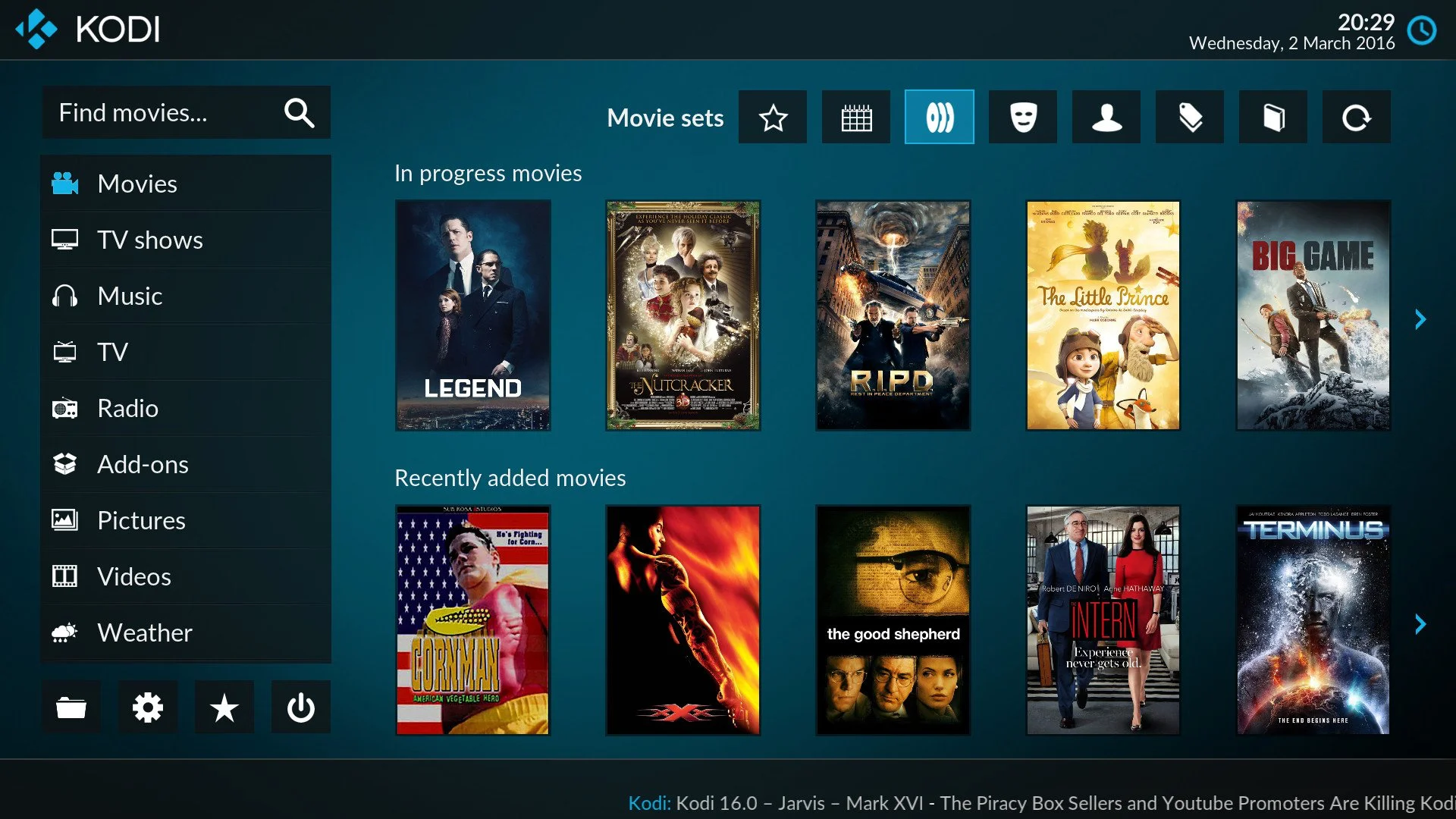
Best for: flexible local playback, custom libraries, and open-source control. Not ideal for: a setup that must remain effortless for multiple viewers with no one maintaining it.
Kodi's broad compatibility is less valuable when add-ons, permissions, or device updates make daily use unpredictable. I would choose it for a person who enjoys owning the setup, not merely for the longest supported-format list.
Plex for Shared Libraries
Plex fits a shared library that needs centralized metadata and clients across different screens. Plex Direct Play sends a compatible file as-is; Direct Stream repackages compatible tracks; transcoding changes video, audio, or both when the client cannot use the source combination.
Free software transcoding exists. Plex Pass can add features such as hardware-accelerated transcoding and additional controls, but paying does not make every file direct-play. Container, codec, subtitle, network, client, and server capability still decide the path.
Best for: one managed library serving several clients. Not ideal for: viewers who do not want a server running or maintained. I treat that operational cost as part of the player; when it does not fit, a different client or a focused Plex alternative workflow may suit the same library better.
Infuse for Apple TV Libraries
Infuse is best for an Apple TV user who wants native client playback from SMB shares or compatible library services without replacing the streaming box. It can connect to Plex, Jellyfin, Emby, and direct network shares, while presenting the collection in a tvOS interface.
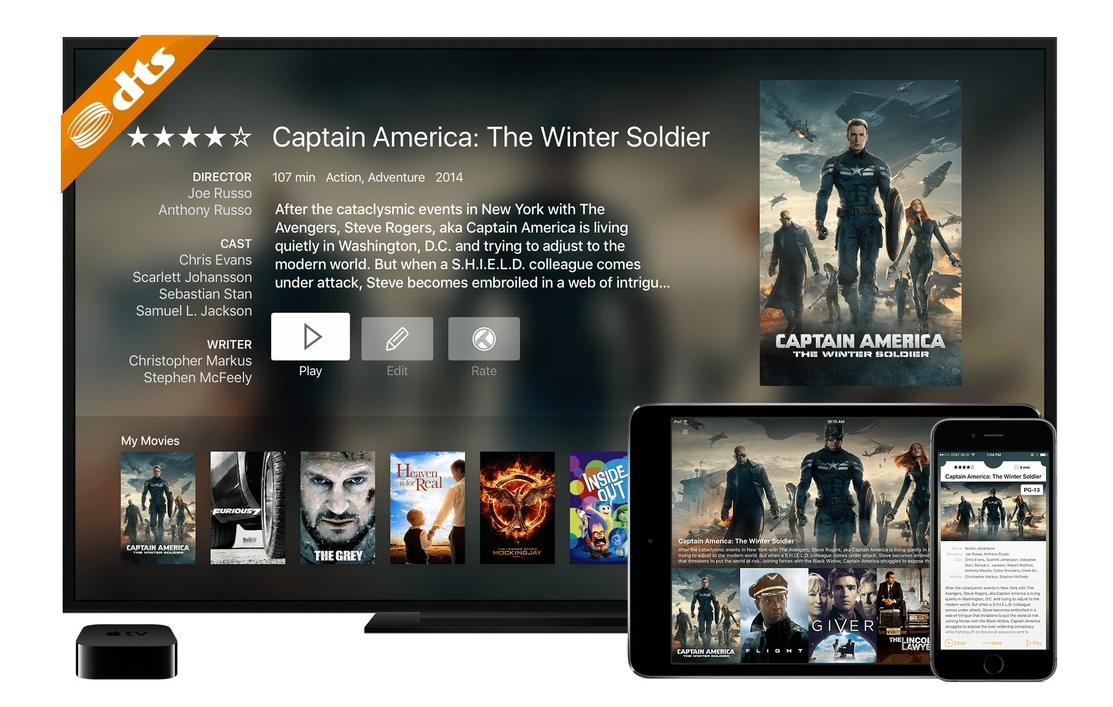
Best for: Apple TV local libraries and a low-maintenance client experience. Not ideal for: Windows users or receivers that depend on native bitstream behavior for specific lossless formats.
Infuse and Plex can feel different on the same Apple TV because one emphasizes client-side playback while the other may involve a server decision. That is a workflow difference, not proof that either client is universally smoother.
Formats and Direct Play Matter More
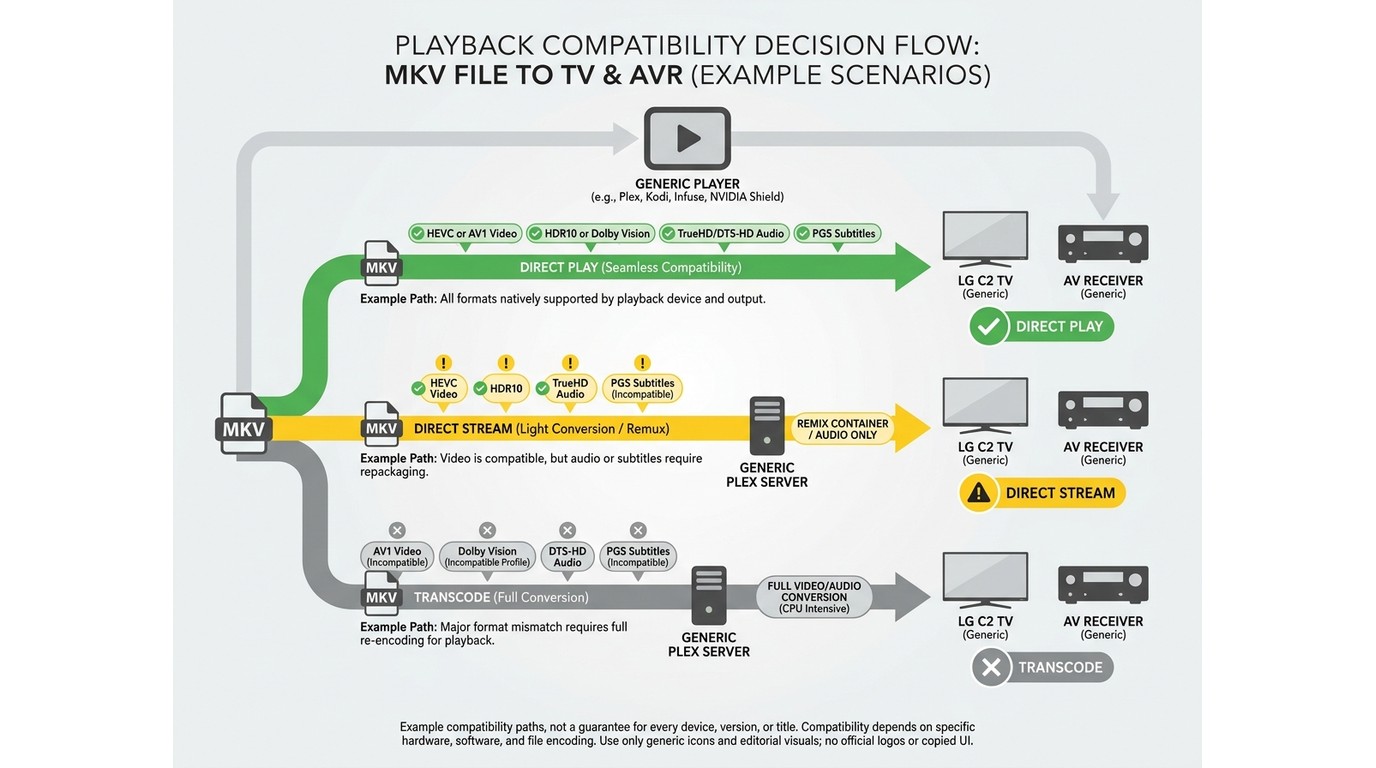
A claim that one TV media player supports all formats is not a useful buying standard. Real compatibility comes from the complete combination of container, video profile, audio track, subtitles, client, network, and display chain.
Containers, Codecs, and HDR Profiles
An MKV label does not reveal whether the video is HEVC, AV1, or another codec, and a Dolby Vision label does not identify the profile or fallback behavior. A 4K HDR media player must support the actual combination, not just one item in it.
| Representative source | Preferred path | Common trigger | Practical check |
|---|---|---|---|
| MKV with HEVC | Direct Play | Client container limit | Inspect playback mode |
| MP4 with AV1 | Direct Play | Older client decoder | Confirm hardware support |
| Dolby Vision profile | Native or fallback | Profile mismatch | Check TV output |
| TrueHD or DTS-HD | Bitstream or decode | Audio-path limit | Read receiver display |
| PGS subtitles | Native rendering | Video transcode | Toggle subtitle track |
| ISO or disc menu | Menu-aware player | No menu engine | Open full navigation |
My practical takeaway is that container, audio, and subtitle combinations predict the result better than a generic 4K logo. One unsupported track can change a clean Direct Play session into Direct Stream or a full transcode.
Audio and Subtitle Triggers
Lossless audio passthrough depends on the playback app, operating system, HDMI hardware, receiver, and selected output mode. If a client decodes TrueHD or DTS-HD to PCM, sound may remain lossless, but receiver metadata and object-audio behavior can differ from native bitstream output.
Subtitles are another frequent trigger. Text subtitles are usually lighter to handle, while image-based PGS subtitles may force video transcoding on some server-client combinations. Test the hardest subtitle and audio pair together because separate format checks can miss that interaction.
Disc Images and Menu Support
ISO menu playback is a separate capability from opening the main video file. A player may read an ISO or folder yet skip full navigation, bonus features, chapter logic, or the intended audio and subtitle selection screens.
For legally owned DVD, Blu-ray, or 4K UHD media, decide whether full menus matter before choosing a box or app. If main-feature playback is enough, more clients become viable; if the disc experience matters, a PC player is usually the clearer route.
Connections, Controls, and Server Needs
Connection and control choices decide whether a technically compatible player feels practical. Compare network stability, local storage, remote behavior, and server upkeep before treating a codec list as the final answer.
Wi-Fi, Ethernet, and Local Storage
Ethernet gives high-bitrate local files a more predictable path, while Wi-Fi can work well when signal strength, channel congestion, and client hardware are suitable. A TV media player hard drive setup avoids network traffic but adds drive power, file-system, and port constraints.
USB is direct and portable. SMB or NFS is easier for a library stored in one place. Offline local playback does not need internet access, but apps that fetch artwork, licensing data, or online subtitles may still use a connection.
Remotes, HDMI-CEC, and Casting
A TV media player in an HDMI chain should be checked for resolution, HDR, audio, and control. HDMI-CEC may let the TV remote control a box, but behavior varies by television, receiver, adapter, and power state.
Casting is convenient for short sessions and shared links, yet it makes a phone or tablet part of the control path. For regular movie viewing, I prefer a setup that can launch, pause, resume, and recover with the physical remote alone.
When a Server Is Required
A server is required for Plex's centralized library model and optional for clients that can open SMB or NFS shares directly. The right media server software should match the clients, remote-access needs, metadata workflow, and expected transcoding load.
When 4K video buffers, diagnose the client, network, codec, subtitles, and playback mode together. A server may be transcoding because of one incompatible track, while a direct client may be limited by Wi-Fi or decoder support.
The easiest setup to control and maintain can be a better purchase than the widest theoretical format list. That is especially true when several people use the same screen but one person would otherwise become the permanent system administrator.
PC-to-TV Playback with PlayerFab
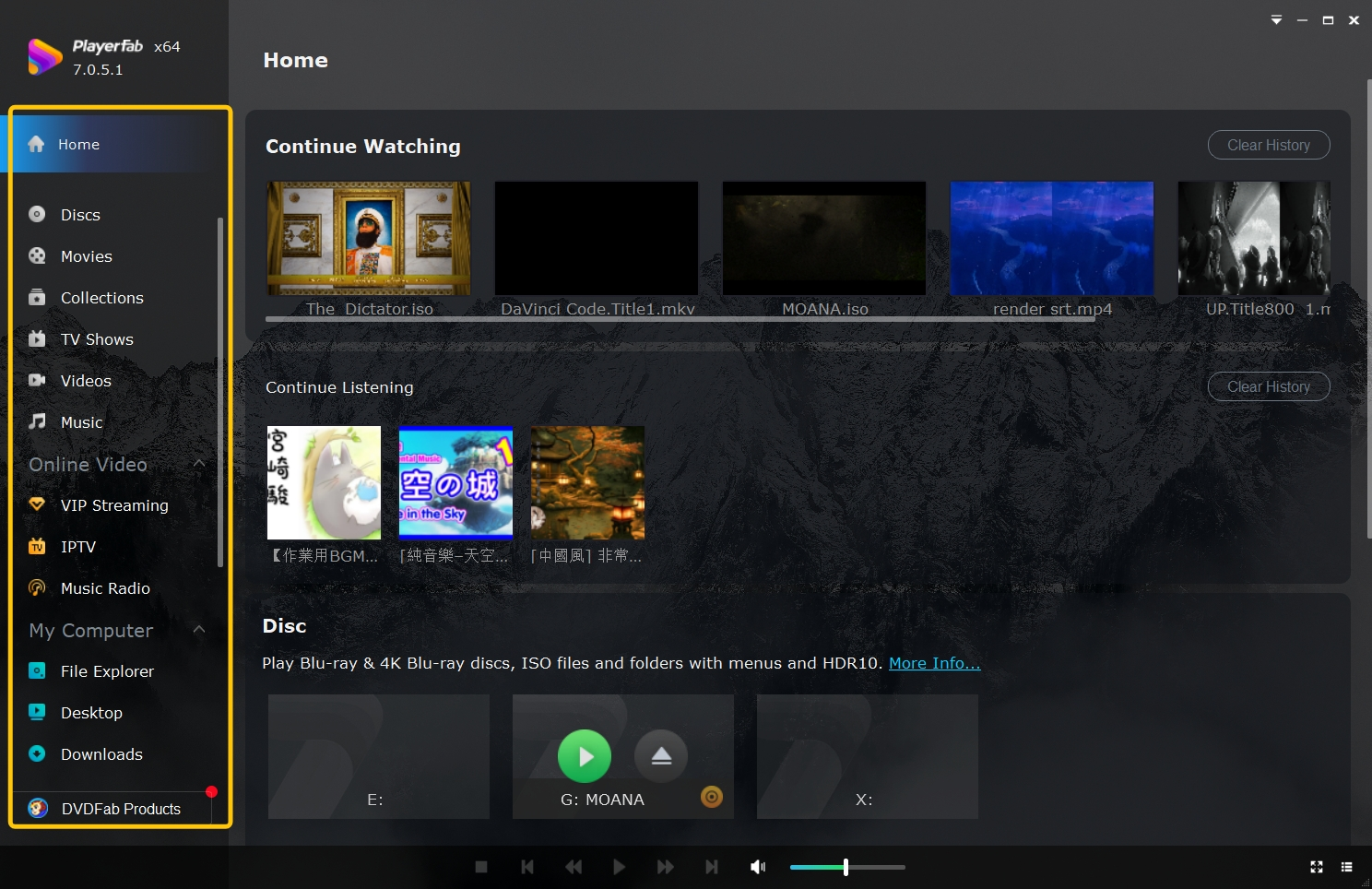
PlayerFab TV playback is a Windows or Mac desktop route for local video, legally owned discs, ISO images, folders, and supported streaming access through a computer connected to the TV. PlayerFab is a playback product; it does not provide streaming download, extraction, or recording.
PlayerFab Ultra HD Player is relevant when the PC is already part of the living-room signal chain and full disc navigation or home-theater audio matters. Readers replacing an older ten-foot PC interface can also evaluate a Windows Media Center alternative within that same source path.
Disc and ISO Menu Playback
PlayerFab supports full-menu playback for supported DVD, Blu-ray, 4K UHD Blu-ray, ISO, and folder sources, with availability determined by the PlayerFab edition, system, optical hardware, and legally owned media. This is the clearest distinction from app-first streaming boxes.
PlayerFab 7.0.5.5 was released February 5, 2026. That build introduced AI Live Subtitle with automatic language recognition and English translation; the feature needs a stable network, can add 1–3 seconds of processing delay, and varies with audio and language conditions.
Lossless Home Theater Audio
The PC-to-receiver route supports high-resolution audio, including Dolby Atmos and DTS:X, when the PlayerFab edition, source, operating system, HDMI hardware, receiver, and output settings all support the selected track.
This flexibility matters when the receiver's native format indicator or object-audio path is important. It also means setup is more involved than a compact streaming box, because one incorrect output setting can change the final audio path.
Best Fit and Limitations
Best for: a Windows or Mac computer connected by HDMI to a TV or receiver, especially for local files and legally owned disc or ISO navigation. Not ideal for: viewers who want a TV-box app, mobile playback, or a computer-free setup.
PlayerFab All-In-One can combine local video, disc playback, a media library, supported streaming access, and AI Live Subtitle in one desktop player. Streaming access still requires a valid platform subscription, and content availability depends on the service and region.
My view is that PlayerFab earns consideration when the source path already requires a PC. It should not be inserted into an app-only setup merely to add features the viewer does not need.
Best Media Player by Use Case
The best media player for TV changes with the source and control path. The matrix below scopes each recommendation to a specific job, so “best” means fit for that setup rather than a claim of market-wide superiority.
Quick Comparison
| Option | Best fit | Primary source path | Server or connection | Key limitation |
|---|---|---|---|---|
| Google TV or Onn hardware | Value app streaming | Streaming services | Wi-Fi or Ethernet | App-dependent local support |
| Roku or Fire TV hardware | Simple daily streaming | Streaming services | Wi-Fi; Ethernet varies | Limited complex local files |
| Apple TV with Infuse | Apple local library | NAS or server | Network share or service | No Windows Infuse client |
| NVIDIA Shield with Kodi | Flexible local playback | USB, NAS, local files | Direct or network | Higher setup effort |
| Plex server and client | Shared managed library | Central server | Server always available | Transcoding and upkeep |
| PC with PlayerFab | Disc and ISO route | PC, disc, local files | Windows or Mac HDMI | Computer in signal chain |
U.S. product lineups and prices discussed below are as of August 2026.
The matrix reinforces one editorial conclusion: direct compatibility and daily control matter more than the number of features. A technically broader option can still be the poorer fit when it adds a server, computer, or maintenance routine the viewer does not want.
Price and Long-Term Value
Up-front price is only one part of value. Google's U.S. store lists the Google TV Streamer at $99.99, while Onn, Roku, and Fire TV offer model ranges aimed at different budgets. Apple TV and NVIDIA Shield generally require a higher initial spend, but ecosystem fit or local-file needs may justify it.
Kodi has no software license cost, yet setup time has value. Plex can add subscription costs and a continuously available server. Infuse uses its own paid model for full features. PlayerFab value depends on choosing the edition that includes the PC, disc, and streaming features required.
I would price the whole path: player, storage, server, receiver compatibility, control hardware, and the time needed to keep it working. The cheapest box can become the expensive choice if it forces transcoding or a second device.
Frequently Asked Questions
Does Infuse run on Windows?
Infuse on Windows is not available. Infuse is built for Apple platforms, so a Windows setup needs a PC media player or a server-client workflow that matches the library and target screens.
Why can a 4K file still buffer or transcode?
Resolution is one variable. The container, video profile, audio track, subtitles, client decoder, network path, and server capacity can each trigger Direct Stream or transcoding, so inspect the active playback mode before blaming the 4K file.
Can I play files from a USB drive without a server?
Yes, if the TV or player has a usable USB port and supports the drive's file system plus the file's video, audio, and subtitle combination. A powered hard drive may also need its own power supply.
What should I test before choosing a TV media player?
Use the hardest representative file in the library, then test subtitles, the preferred audio track, seeking, resume, remote control, and the real wired or wireless path. That single workflow exposes more than a generic specification sheet.
Final Recommendation by Setup
The best media player for TV depends on the source path: choose Google TV, Onn, Roku, or Fire TV for mainstream apps, accepting app-dependent local support; Apple TV with Infuse for an Apple-centered local library, accepting its platform and audio-path limits; Plex for a shared managed library, accepting server upkeep; Kodi for flexible local playback, accepting configuration work; and PlayerFab for a Windows or Mac disc or ISO route, accepting a computer in the HDMI chain. My overall judgment is to buy for source compatibility and daily usability, not the broadest theoretical feature list.

 6 Best MPEG Players for Windows and Mac (2026)By Alice Harper - Aug 26, 2026
 How to Play Blu-ray Discs on Windows 10 (Free & Pro Solutions)By Alice Harper - Aug 7, 2026
 10 Best 4K Video Players for PC and Mac, Tested in 2026By Alice Harper - Aug 4, 2026
 The 5 Best Free MOV Players in 2026 (Windows, Mac and Android), plus How to FixBy Alice Harper - Aug 4, 2026