PlayerFab Ultra HD Player Review: 4 Compatibility Checks for Modern Windows PCs

Summary: PlayerFab Ultra HD Player combines supported DVD, Blu-ray, 4K UHD Blu-ray, ISO, and local-file playback in a desktop media library. Its strongest fit is a Windows home-theater setup with a validated UHD drive, GPU decoding path, HDR display, and HDMI audio chain. Mac menu limits and hardware dependencies deserve attention before purchase.
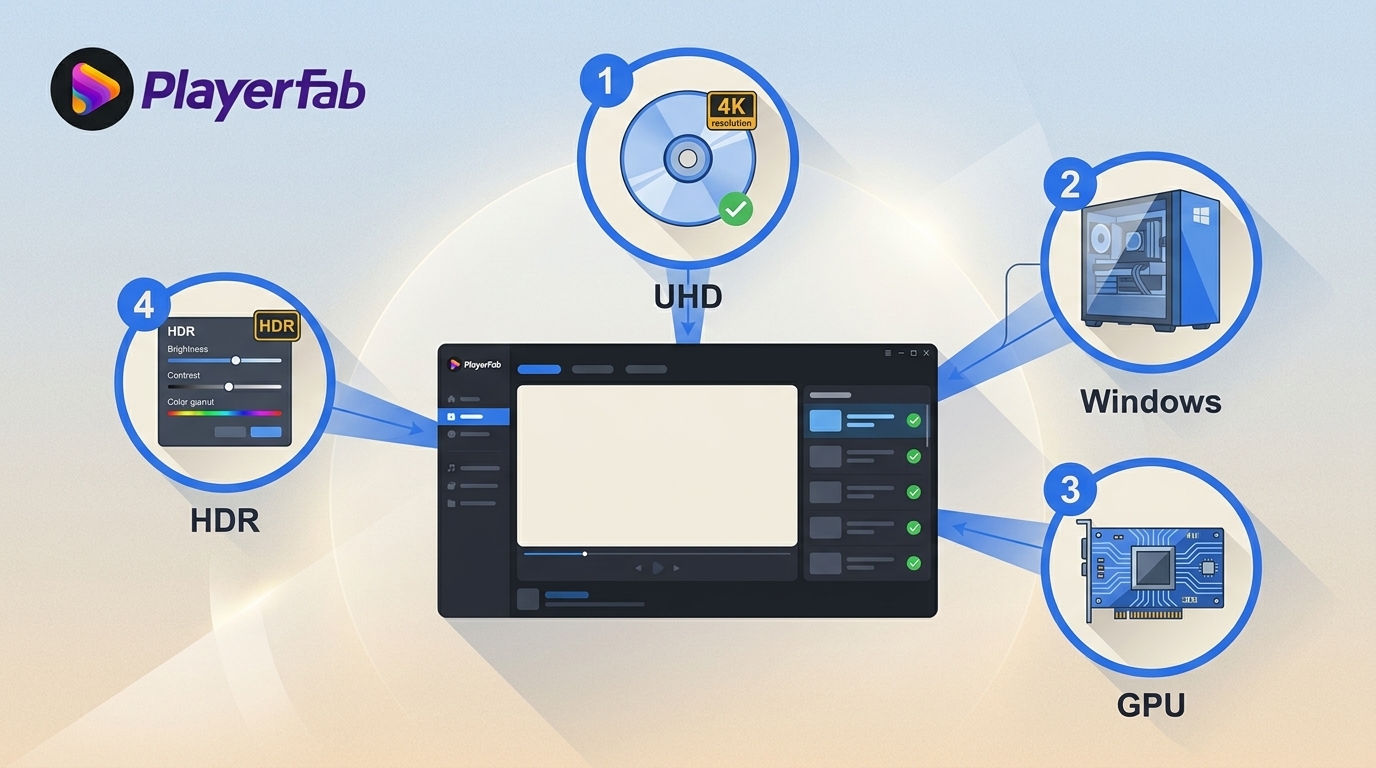
Table of Contents
PlayerFab Ultra HD Player is a desktop 4K UHD player for PC and Mac, but the buying decision depends on the complete playback chain. Compatible software cannot compensate for hardware or a connection that cannot carry the source correctly.
If you searched for PlayerFab Ultra HD Player because a modern Windows PC still refuses UHD Blu-ray playback, the problem is often compatibility rather than a missing feature checkbox. This product-specific PlayerFab Ultra HD review focuses on four checks, then separates disc and file support, HDR and audio capability, current competitor roles, pricing limits, and who should buy. The broader PlayerFab lineup review explains how the editions differ.
What PlayerFab Ultra HD Player Does
PlayerFab Ultra HD Player combines supported disc, ISO, folder, and local-file playback with a poster-based local media library. It runs on Windows and macOS, but platform and SKU limits matter more than the product-family name.
The PlayerFab Ultra HD Player edition sits above the DVD and Blu-ray editions for 4K UHD, HDR, Dolby Vision, high-resolution audio, and 3D Blu-ray playback. It is a player, not an editor or export utility, and supported streaming access still requires a valid platform subscription.
Windows is the documented route for complete DVD, Blu-ray, and 4K UHD Blu-ray menu navigation. On macOS, buyers who require full Blu-ray menus should plan around the current Simple Mode workflow. My buying advice is to decide whether disc-native navigation is essential before comparing broader feature lists.
Simple Mode vs. Menu Mode
Simple Mode playback opens the main feature directly, while Menu Mode navigation preserves the disc interface, chapter selection, bonus material, and audio or subtitle choices.
- Simple Mode: suited to quick viewing when the main feature matters more than the disc interface.
- Menu Mode: suited to bonus features, chapter access, alternate cuts, and disc-native navigation.
The distinction is practical rather than cosmetic. A person who mainly watches the feature can value speed, while a collector who bought a special edition may consider the menus part of the content.
Hardware Setup and Compatibility Checks
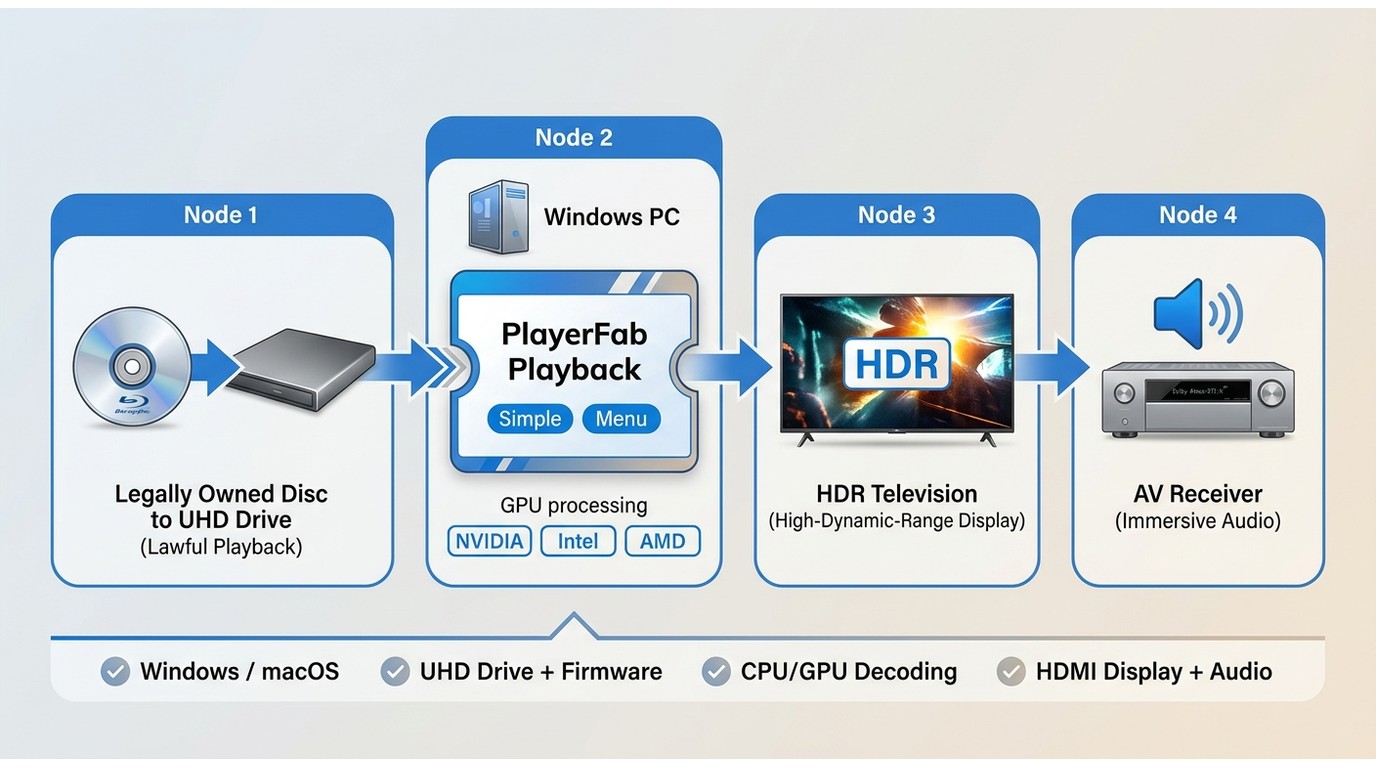
Reliable UHD Blu-ray playback depends on four linked checks. A failure anywhere in that chain can look like a software problem even when the player is functioning as designed.
| Compatibility check | What to confirm | Why it matters |
|---|---|---|
| Operating system | Supported Windows or macOS build | Controls drivers and available features |
| Optical drive | UHD-capable optical drive and suitable firmware | Determines whether the disc can be read |
| CPU and GPU path | Supported decoding path and current driver | Handles high-resolution video efficiently |
| Display and audio | HDR display and HDMI audio chain | Carries picture metadata and bitstream audio |
PlayerFab lists NVIDIA NVDEC, Intel Quick Sync Video, and AMD AMF/VCE hardware acceleration. Those are published decoding paths, not a promise that any unnamed CPU and GPU combination will play a particular disc without interruption.
- Confirm that the optical drive can physically read 4K UHD Blu-ray media and uses suitable firmware.
- Install the official PlayerFab build for the supported desktop operating system.
- Run the built-in hardware analysis and review the available GPU decoding path.
- Choose Simple Mode or Menu Mode according to the disc and navigation need.
- Configure HDR output and HDMI Bitstream or LPCM audio for the connected equipment.
- Load a legally owned disc and note the exact point where playback succeeds or fails.
- Diagnose in order: disc condition, drive, firmware, driver, decoding path, display connection, then player settings.
Any observed result should name the Windows version, CPU, GPU, optical drive, display, and connection. Without that configuration, specifications cannot support a universal reliability claim. This product is less suitable when the checklist cannot be completed before purchase.
Media Library and Disc-to-ISO Import
The local media library is a confirmed playback feature; disc-to-ISO import is a separate media-creation task and should not be confused with ISO playback. PlayerFab Ultra HD Player can organize and play authorized ISO files already stored in the library.
- Poster and metadata matching: organizes local movies for visual browsing.
- Library filters: support browsing by media type, year, and collection.
- ISO playback: opens supported disc images without treating playback as file conversion.
The local media library is genuinely useful for a large collection on desktop storage or a NAS. A lightweight local-file player is enough when the workflow is simply opening an occasional MP4 or MKV from a folder.
Format and Disc Support
PlayerFab covers DVDs, Blu-rays, 4K UHD Blu-rays, 3D Blu-rays, ISO images, folders, and common video files. The meaningful limits come from the purchased SKU, operating system, optical drive, source media, and connected equipment.
Supported Discs and Playback Modes
UHD Blu-ray playback is part of the Ultra HD edition, alongside DVD, Blu-ray, 4K UHD Blu-ray, and 3D Blu-ray support. Menu availability depends on the edition and platform rather than the disc label alone.
| Media type | Playback role | Navigation | Key dependency |
|---|---|---|---|
| DVD | Physical disc, ISO, folder | DVD menus | Edition and drive |
| Blu-ray | Physical disc, ISO, folder | Blu-ray menus | Edition, platform, drive |
| 4K UHD Blu-ray | Disc, ISO, folder | UHD menus | Ultra HD SKU and hardware |
| 3D Blu-ray | Supported 3D playback | Disc navigation | Compatible display chain |
PlayerFab describes support for legally owned discs from different regions, but region handling does not give an optical drive the physical ability to read UHD media. The Blu-ray region handling guide adds context without replacing the drive check above.
Playable Files vs. ISO Library Import
MP4 is a playable input format. PlayerFab Ultra HD Player also plays supported ISO images, but its verified role is playback rather than creating ISO or MP4 output from a disc.
Supported containers include MKV, MP4, AVI, MOV, WMV, FLV, M2TS, TS, VOB, and ISO. Listed video codecs include H.264/AVC, H.265/HEVC, VP9, AV1, MPEG-2, and MPEG-4. That coverage matters when a local media library mixes older files with newer UHD encodes.
Audio Format Support and Passthrough Options
Dolby Atmos passthrough and DTS:X are available through the documented HDMI Bitstream path, with LPCM and headphone or speaker output for other setups. The product also lists Dolby TrueHD, Dolby Digital Plus, DTS-HD, PCM, FLAC, AAC, and MP3, with support up to 7.1 channels.
The practical choice is straightforward: use HDMI Bitstream when a compatible receiver should decode the original audio format, or LPCM when the computer should decode it before output.
HDR and Audio Performance
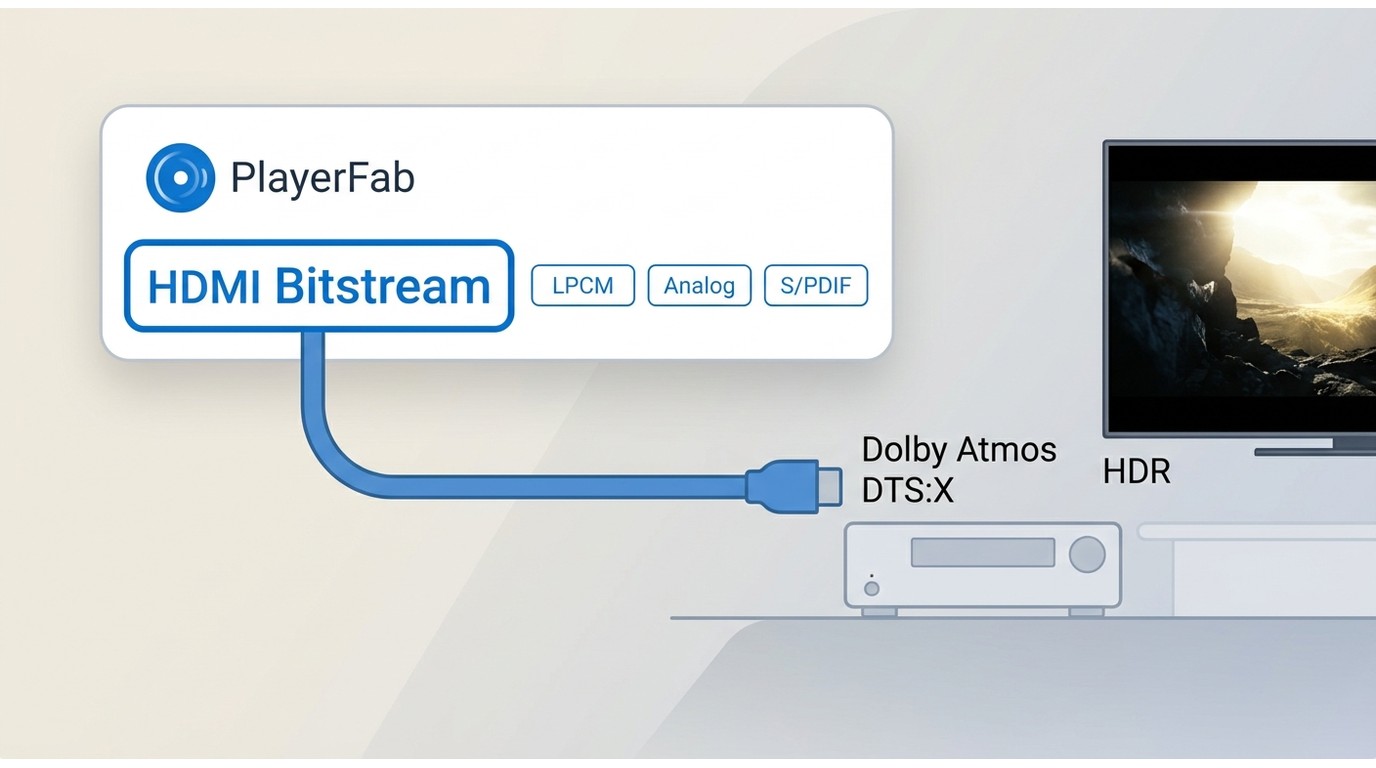
PlayerFab's published capability reaches 4K UHD 3840×2160 at up to 60fps, with HDR10, HDR10+, Dolby Vision, and HLG subject to the edition, operating system, GPU, source, and display chain.
HDR video playback depends on more than an HDR label in the player. The display must accept the signal, the GPU and driver must expose the right output path, and the connection must carry the expected metadata. A range mismatch can create washed-out blacks or clipped highlights even when playback starts normally.
In my experience reviewing home-theater software, a mismatched display or HDMI setting is a more productive first check than assuming the disc itself is at fault.
The same discipline applies to audio. Dolby Atmos and DTS:X should be evaluated through the HDMI receiver path and the player's output setting, not inferred from a format badge. Specifications alone do not establish behavior on a particular triple-layer disc, so this review does not turn format support into a blanket skipping or stability claim.
PlayerFab vs. PowerDVD and VLC
PlayerFab, PowerDVD, and VLC serve different jobs. PlayerFab focuses on a unified desktop disc and local-media workflow, PowerDVD remains a Windows Blu-ray and media player, and VLC is a general-media option rather than a commercial UHD Blu-ray Disc peer.
| Dimension | PlayerFab Ultra HD Player | CyberLink PowerDVD | VLC media player |
|---|---|---|---|
| Current operating systems | Windows, macOS | Windows | Windows, macOS, Linux |
| Commercial UHD Blu-ray Disc | Ultra HD edition | Not current since April 2025 | Not a commercial-disc peer |
| Full disc menus | Supported by edition and platform | Windows Blu-ray menus | Not equivalent |
| HDR and lossless audio | HDR formats and HDMI Bitstream | Current Windows media features | File and setup dependent |
| ISO library handling | ISO playback and poster library | Local media playback | Manual file browsing |
| Price model | Paid edition | Paid edition | Free, open source |
PowerDVD UHD support is the decisive distinction. CyberLink states that commercial UHD Blu-ray Disc playback on Windows PCs has not been possible since April 2025, so current PowerDVD releases are not interchangeable with PlayerFab for that job. PowerDVD still makes sense for its active Windows Blu-ray and media-player features.
VLC remains a good fit for ordinary local media when disc menus, commercial UHD Blu-ray Disc playback, and a poster-based library are not required. My fit judgment is to compare the task first: disc playback, local-file playback, and library management are related, but they are not the same workflow.
Pricing, Pros, Cons, and Best Fit
PlayerFab Ultra HD Player is a paid desktop edition for people who need more than basic local-file playback. The purchase case is strongest when 4K UHD discs, HDR, disc menus, and home-theater audio belong to the same workflow.
Pricing, Trial, and License Scope
The PlayerFab Free Video Player covers common local files, while Ultra HD Player adds the verified UHD disc, HDR, menu, and high-resolution audio scope. The official trial, price, license term, and device scope follow the active PlayerFab offering.
Searches for “DVDFab Player Ultra” may point toward the same product family, but buyers should match the current edition name and entitlement to PlayerFab Ultra HD Player before choosing a license.
Pros
- One desktop player for supported local files, ISO images, DVDs, Blu-rays, and 4K UHD Blu-rays.
- Up to 4K UHD, multiple HDR formats, HDMI Bitstream, and high-resolution audio support.
- Disc menus and a poster-based local media library reduce tool switching.
Cons
- Reliable UHD playback depends on completing the compatibility checklist above.
- Platform-specific menu limits matter to collectors who use disc navigation.
- The Ultra HD edition is unnecessary for someone who watches ordinary local files.
Who It Suits and Who Should Skip It
It suits a disc collector or home-theater user who wants a 4K UHD player for PC, native disc navigation, HDR output, and HDMI audio in one desktop workflow. It is also a reasonable fit for an authorized ISO library that benefits from poster and metadata organization.
It is less suitable for casual MP4 playback, mobile viewing, or a Mac workflow that requires complete Blu-ray menus today. It is also a poor purchase when the compatibility checklist cannot be completed.
Frequently Asked Questions
Does the macOS version include full Blu-ray menus?
No current feature parity with the Windows menu workflow is stated; Simple Mode remains the practical Mac path when full disc navigation is not required.
Does region support replace a UHD-capable drive?
No. Software-level region handling cannot make a standard optical drive read UHD media; the drive and the rest of the playback chain still need to support the disc.
Is an Ultra HD player the same as a 4K player?
Not necessarily. “4K player” may describe local 4K files, while a 4K UHD player for PC may also need commercial UHD Blu-ray Disc support, menus, HDR output, and compatible hardware.
Why can a UHD-capable drive still fail to play a disc?
A capable drive solves one link in the chain. Use the diagnostic order above to isolate media, firmware, decoding, connection, and player-setting problems.
Is the official PlayerFab download safer than a modified build?
The official PlayerFab download is the supportable route. The main modified build risks are files that cannot be authenticated, no vendor support, and uncertain update behavior; use the official installer and available trial.
Conclusion
This PlayerFab Ultra HD review points to a clear fit: desktop disc collectors who can complete the four compatibility checks above. Its material limitation is that features vary by platform and hardware. Confirm the setup before paying for capability it cannot use.

 6 Best MPEG Players for Windows and Mac (2026)By Alice Harper - Aug 26, 2026
 How to Play Blu-ray Discs on Windows 10 (Free & Pro Solutions)By Alice Harper - Aug 7, 2026
 10 Best 4K Video Players for PC and Mac, Tested in 2026By Alice Harper - Aug 4, 2026
 The 5 Best Free MOV Players in 2026 (Windows, Mac and Android), plus How to FixBy Alice Harper - Aug 4, 2026