Netflix DVD Players with Wi-Fi: 5 Models Checked for 2026

Summary: A Netflix button and Wi-Fi label do not prove that a disc player's app still works. This guide checks five Sony, Samsung, and LG models by current status, separates disc quality from streaming support, explains setup, and compares dedicated hardware with PlayerFab on Windows and Mac.
Finding a DVD player with Netflix app support is harder than the familiar red button suggests. A DVD player with Wi-Fi and Netflix branding may still play discs perfectly while its streaming app is outdated, unavailable, or no longer supported on that exact model.
Netflix DVD Players with Wi-Fi: 5 Models Checked for 2026 is a compatibility-first guide to five commonly listed players, followed by a buying checklist, setup steps, a separate-streamer fallback, and PC software. The key distinction is simple: disc playback can remain useful long after a built-in streaming interface ages out.
5 Netflix DVD Players: 2026 Compatibility Check
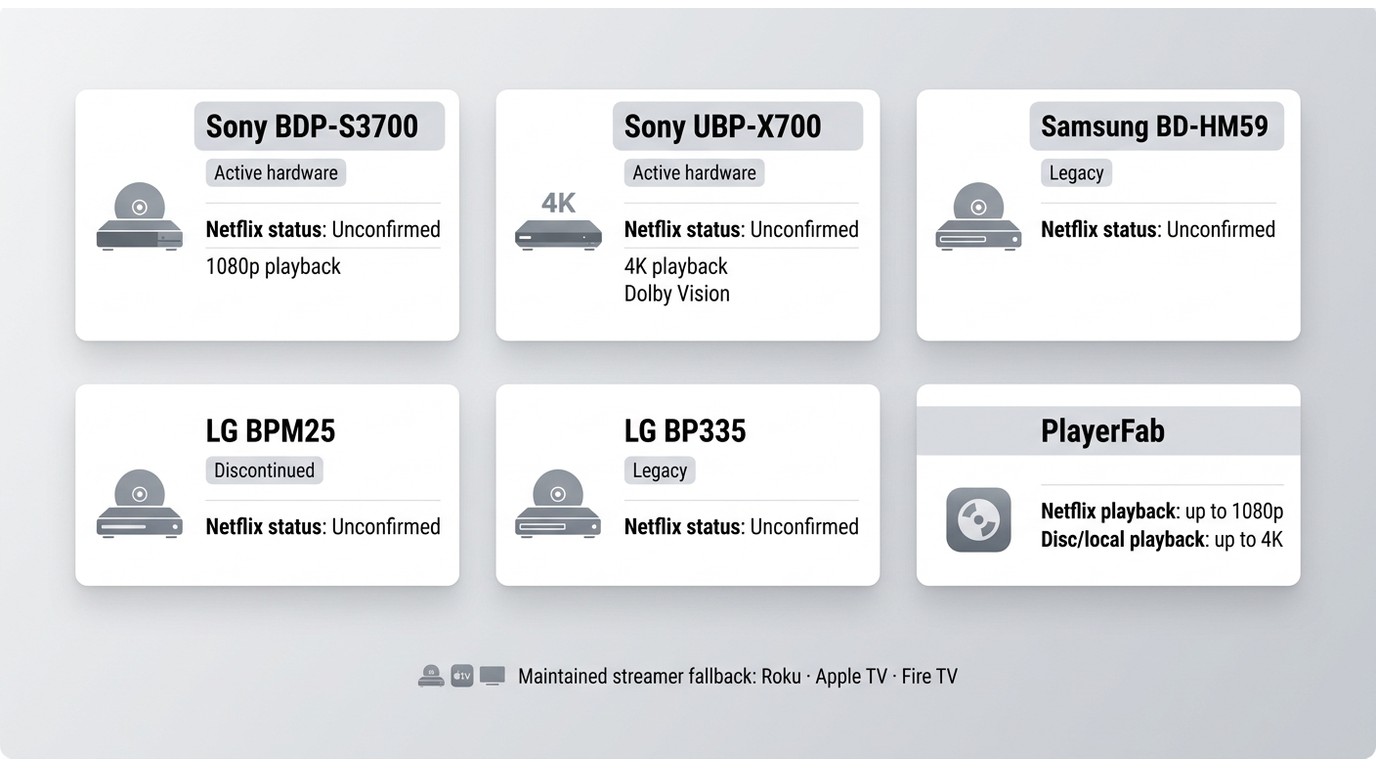
Netflix-compatible DVD players should be judged by exact-model app support, not by an old feature list. Netflix warns that some devices made before 2015 may no longer be supported. Samsung stopped introducing Blu-ray players in the US in 2019, and LG ended its Blu-ray player line in December 2024. Disc playback does not establish continuing Netflix app support.
The term Netflix DVD player is also imprecise. Every hardware model here is a Blu-ray player that also handles DVDs, while Wi-Fi supports apps, updates, or network media rather than ordinary disc playback. My buying rule is to separate four states: hardware still sold, support pages still maintained, firmware still available, and the Netflix app still functional.
| Model | Disc formats | Networking | Disc video output |
|---|---|---|---|
| Sony BDP-S3700 | DVDs, Blu-ray™ Discs | Built-in Wi-Fi and Ethernet | Up to 1080p |
| Sony UBP-X700 | 4K Ultra HD Blu-ray, standard Blu-ray, 3D Blu-ray, DVD, CD, and SACD | Built-in Wi-Fi and Ethernet | Up to 4K UHD |
Hardware specifications: Sony official product pages, as of July 2026.
The practical result is that app longevity and ease of use matter more than a long historical app list. Before buying any smart DVD player Netflix listing, check the exact model number, current firmware, Wi-Fi or Ethernet options, disc and streaming resolution separately, HDR and audio needs, remote simplicity, present availability, and whether a basic disc player plus Roku, Apple TV, or Fire TV would be easier to maintain.
Sony BDP-S3700
The Sony BDP-S3700 remains relevant as compact 1080p disc hardware with built-in Wi-Fi, but its active support page is not proof that Netflix still works on every US unit. Treat current app availability as a separate question from Blu-ray and DVD playback.

Its small chassis, front USB input, DVD upscaling, and conventional remote suit a secondary disc setup. A current Sony BDP-S3700 marketplace listing can show availability, but a listing's Netflix logo or copied app list cannot confirm live service.
I would consider this model for a budget 1080p collection only after seeing the Netflix app launch and play on the exact unit or receiving reliable model-specific confirmation. It is a weak match for a 4K theater and for anyone who expects built-in apps to remain current for years.
Sony UBP-X700
The Sony UBP-X700 makes more sense as a 4K UHD disc player than as a streaming-app purchase. Its verified strengths are 4K UHD Blu-ray playback, HDR10, Dolby Vision, dual HDMI outputs, and support for high-resolution disc audio.

The Sony UBP-X700 retail listing may mention streaming services, but 4K disc output and Netflix app resolution are different capabilities.
For a shelf built around Dune, Blade Runner 2049, or Mad Max: Fury Road on UHD disc, the X700's Dolby Vision and separate audio output are meaningful. I would pair it with a maintained streamer rather than make the disc player's app menu the center of the system.
Samsung BD-HM59
The Samsung BD-HM59 is a legacy reference, not an equal current recommendation. It historically combined Blu-ray, DVD, 3D playback, Wi-Fi, USB media, and Samsung's older smart interface, but Samsung stopped introducing US Blu-ray players in 2019.

A Samsung BD-HM59 used-market listing is useful for judging supply, not official pricing, warranty, firmware activity, or current Netflix service. Disc playback and the built-in streaming interface are separate functions.
This model fits someone who already owns a working unit and can confirm that the built-in Netflix app still launches and plays. For a new purchase, the aging interface and uncertain service life outweigh the convenience of combining discs and streaming in one box.
LG BPM25
The LG BPM25 should be treated as discontinued or remaining-stock hardware. Its compact body, Wi-Fi, USB input, Blu-ray and DVD playback, and 1080p output still have value, but an old preinstalled Netflix tile does not establish current app support.

The LG BPM25 remaining-stock listing can help locate a unit, but marketplace text often preserves historical streaming claims. Its discontinued status makes current firmware and exact-model app checks more important than the unit's small footprint.
I would use a BPM25 already on hand for discs, then add a current streaming device. It is not a sensible fresh buy when the priority is a Netflix interface that receives continuing attention.
LG BP335
The LG BP335 is another legacy or used-market option whose disc capability should be separated from its old streaming label. Some units were sold with multi-region configurations, but configuration, warranty status, and supported disc regions can vary by seller.

A region free DVD player uses region handling that differs from a standard US retail unit, so that detail should be confirmed for the specific BP335 rather than assumed from the model name. Its Wi-Fi history also does not prove that Netflix remains active.
This player can suit an existing international disc collection when the unit's region setup is known. Buyers who prioritize current apps, straightforward support, or predictable replacement options are better served by newer hardware or a separate streamer.
PC Software for Netflix and 4K Discs
PC software separates two abilities that old all-in-one hardware often blurs: Netflix playback can reach up to 1080p, while 4K refers to compatible UHD discs or local video playback. In this setup, 4K disc support does not mean 4K Netflix playback.
PlayerFab All-In-One
PlayerFab All-In-One is desktop software rather than Netflix's built-in disc-player app.

For compatible discs and local files, the matching edition or module can provide disc-menu playback and desktop library access. These capabilities are separate from Netflix resolution, so 4K disc support should not be read as a 4K streaming promise.
Readers considering Windows DVD playback can use the free DVD player for Windows 10 guide to compare starting points, while PlayerFab All-In-One is the broader desktop edition discussed here.
From a film-library perspective, I see the practical benefit in keeping Netflix playback, a Blade Runner 2049 UHD disc, and local MKV or ISO files within one desktop workflow. The limitation is equally clear: this is less appliance-like than pressing one button on a living-room streamer.
For content you are authorized to access, where permitted by platform terms and applicable law, choose the mode that matches the source and avoid treating streaming access as ownership. A computer connected to the TV remains part of the setup. Windows users can start with the PlayerFab All-In-One Windows download, while Mac users can assess the separate DVDFab Player 6 for Mac download.
Set Up Netflix on a Compatible Disc Player
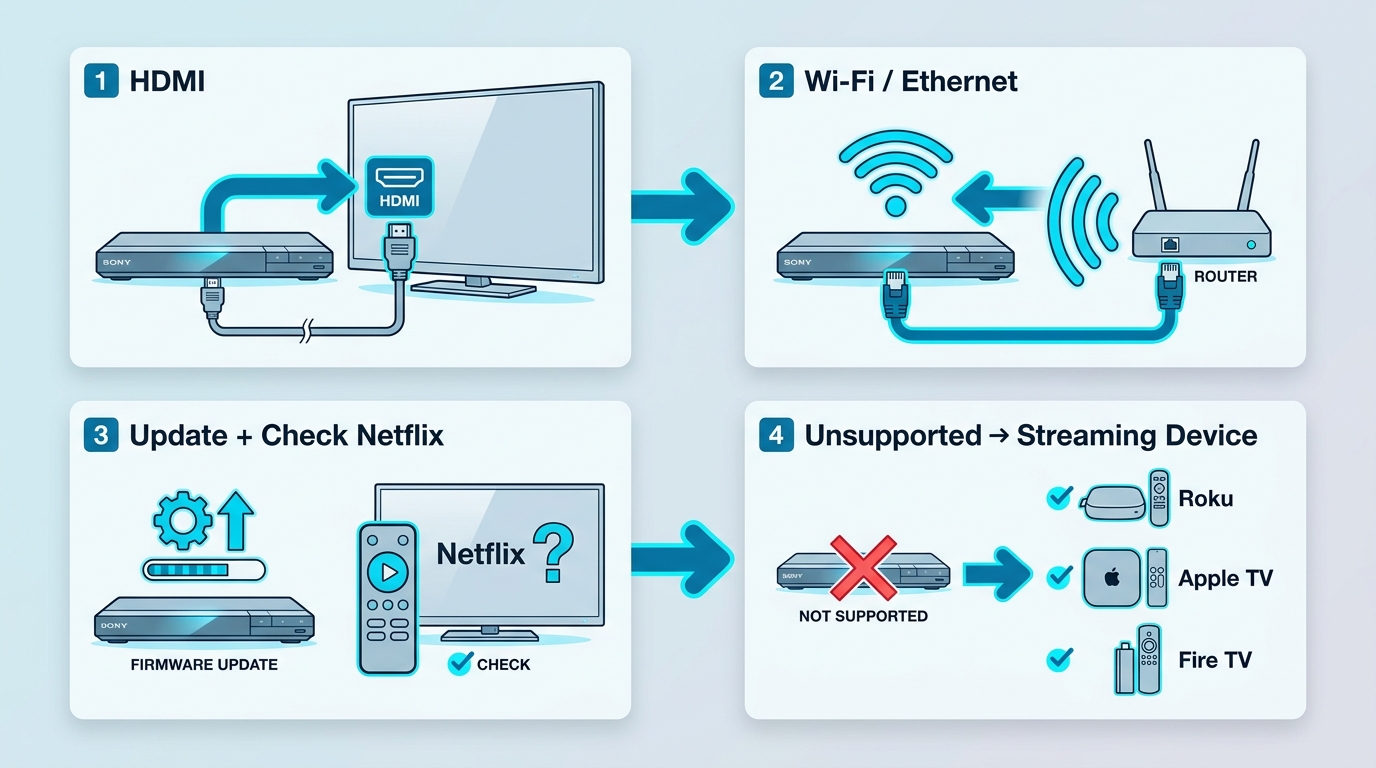
Setup works only when the exact player still supports Netflix. Update available firmware first, confirm that the app remains listed for the model, and make sure the TV connection meets the player's HDMI requirements before troubleshooting the network.
Wi-Fi supports apps, firmware updates, and DVD player network streaming features. It is not needed for ordinary DVD or Blu-ray playback. If the player supports Ethernet and wireless performance is unstable, I favor the wired connection because it eliminates one variable without changing the disc setup.
- Connect the player and TV. Use the appropriate HDMI input and follow this guide on how to connect a DVD player to a TV. Then select that input on the television.
- Join the network. Open the player's Network or Internet settings, choose Wi-Fi and enter the password, or connect Ethernet if the model provides a wired port.
- Open the supported Netflix app. Go to Apps or Streaming Services and launch Netflix. Sign in with an active Netflix account. An app-store search or factory reset may not bring Netflix back if support for that device has ended.
- Start playback and check stability. Select a title, confirm that video and audio play normally, and test the remote controls. If the app is missing or repeatedly fails after firmware and network checks, use a maintained streamer instead of assuming the disc player can be restored.
A streaming Wi-Fi DVD player can still be convenient, but the network checklist should come after the compatibility check. A stable connection cannot revive an app that the service or device platform no longer supports.
Netflix DVD Player FAQs
These answers focus on app compatibility and setup, not another model ranking.
Does a Netflix Button Mean the App Still Works?
No. The button shows how the remote was labeled when the product was sold. A DVD player with Netflix can keep its physical button after the app has changed or ended, so current support depends on the exact model, firmware, device platform, and Netflix's current policy.
Why Does a Disc Player Need Wi-Fi?
A DVD player Wi-Fi Netflix connection is used for streaming apps, firmware updates, and some network-media functions. DVDs and Blu-ray discs play from the optical drive without Wi-Fi, although online extras or updates may still need a connection.
Why Did Netflix Disappear From My Player?
The DVD Netflix app can disappear when the device platform ages, security requirements change, firmware support ends, or Netflix stops supporting that model. Some devices made before 2015 may no longer work with Netflix, and later models can also lose support. Sony ended Netflix service on the specific Blu-ray models listed in its notice in June 2025. That notice does not establish the status of the BDP-S3700 or UBP-X700. A factory reset cannot restore a retired Netflix service. When support has ended, move Netflix playback to a supported streaming device.
Can You Still Get Netflix Movies on DVD?
This guide uses Netflix DVD player to mean a disc player that also streams Netflix. It does not mean that the player turns Netflix titles into DVDs. Use Netflix through a supported app, and use separately licensed DVDs or Blu-rays for physical-disc viewing.
Which Netflix DVD Player Setup Fits You?
If you already own a disc player with a working, supported Netflix app, keeping it is the simplest route. Confirm that Netflix launches and plays on the exact unit rather than relying on a Sony support page, a marketplace logo, or a Netflix button on the remote.
A separate streaming device can handle Netflix while the existing disc player continues to play DVDs and Blu-rays. I favor this setup when app longevity and remote simplicity matter more than saving one HDMI input, although the extra box may not suit a tight shelf or a single-remote room.
If a Windows or Mac computer already anchors your disc library and TV setup, a compatible desktop player edition offers a computer-based route. It requires a connected computer, so choose the official download listed above only if that layout fits your viewing space.

 Multi-Disc Blu-ray Player Status: Why They're Rare & Modern AlternativesBy Alice Harper - Nov 5, 2026
 12 VOB File Player Options for Windows, Mac, and MobileBy Alice Harper - Nov 4, 2026
 6 Best 3D Blu-ray Players in 2026: Hardware and PC PicksBy Alice Harper - Nov 4, 2026
 Best 4K Blu-ray Players in 2026: 7 Hardware Picks and PC PlaybackBy Alice Harper - Nov 4, 2026